> For the complete documentation index, see [llms.txt](https://docs.snyk.io/llms.txt). Markdown versions of documentation pages are available by appending `.md` to page URLs; this page is available as [Markdown](https://docs.snyk.io/scan-fix-and-prevent/scan-with-snyk/snyk-projects/import-project-repository/exclude-directories-and-files-from-project-import.md).
# Exclude directories and files from Project import
How to exclude directories and files when importing a Project
{% hint style="info" %}
**Snyk is rolling out a new navigation.** The steps on this page describe the classic interface. If your view looks different, visit [Navigate the Snyk Web UI](https://docs.snyk.io/navigate-the-snyk-web-ui#where-things-moved) to map these options to the new interface.
{% endhint %}
## Exclude directories and files from Project import
If you import a Project through an SCM integration, add the folders to exclude in the **Exclude folders** field of the import window.
When you import a repository to be tested by Snyk Code, you can exclude certain directories and files from the import by using the `.snyk` file. The `.snyk` file is a YAML policy file that can contain shell matching patterns (regular expressions), which allow you to specify the directories and files you want to exclude from the import process. The `.snyk` file should be created in the repository you intend to import.
{% hint style="info" %}
* In Snyk Code, the `.snyk` file can only be used to exclude directories and files from import. It cannot be used to ignore vulnerabilities or for any other action, as in other Snyk products.
* The `exclude` option in the `.snyk` file applies only to the Snyk Web UI, CLI, and IDE environments.
* In certain situations, your excluded files may not be excluded if there is an invalid `.snyk` file. In these situations, the scan continues without the `.snyk` file.
{% endhint %}
{% hint style="info" %}
Consider excluding directories and files only if you do not publish or compile them into production. If a trace goes through an excluded file or directory with existing vulnerabilities, Snyk might miss potential issues.
{% endhint %}
You can also use the instructions in this section to exclude directories and files from the [Snyk Code CLI test](https://docs.snyk.io/developer-tools/snyk-cli/scan-and-maintain-projects-using-the-cli/snyk-cli-for-snyk-code/scan-source-code-with-snyk-code-using-the-cli), by creating the `.snyk` file in your tested repository.
### Exclusion syntax of the `.snyk` file
#### Syntax to use to exclude files and directories from Snyk Code testing
Use the following syntax to exclude files and directories by using the `.snyk` file:
# Snyk (https://snyk.io) policy file
---
exclude:
    global:
        # Exclude a single file. For example, - test.spec.js
        - file_name.ext
        # Exclude a single directory. For example, - src/lib
        - source/directory_name
        # Exclude any file with a specific extension in the specific directory. For example, - tests/.js
        - directory_name/.ext
        # Exclude files with a specific ending in any directory. For example, - “*.spec.js”
        - "*.ending.ext"
        # Exclude files in directories that have the same name with a different ending, like “test” and “tests”. The last character before the question mark is optional. For example, - tests?/
        - directory_name?/
        # Exclude all files and directories located within any specified folder within your Project. For example, directory_name/** matches and excludes all contents under any directory named directory_name. It is not constrained to the root level or the location of the .snyk file.
        - directory_name/**
{% hint style="info" %}
You can use `global` or `code`. Either excludes the specified directories and files from Snyk Code tests. `code` applies only to Snyk Code analysis. `global` applies to Snyk Code and Snyk Secrets, and to other products that support it.
Snyk Secrets also supports a `secrets` section, which applies only to Snyk Secrets scans. For details, visit [Use the `.snyk` file with Snyk Secrets](https://docs.snyk.io/scan-fix-and-prevent/scan-with-snyk/snyk-projects/import-project-repository/pages/9glmQ5scbAaqPr49sLVE#use-the-.snyk-file-with-snyk-secrets).
{% endhint %}
#### Considerations in creating the `.snyk` file
* The path in the rule should be relative to the `.snyk` file location.
* Do not use paths starting with `./`.
* All rules must have a preceding dash to be valid: `- `
* For rules beginning with special characters and patterns, such as an asterisk character `*`, you must wrap them in double quotes (`" "`). This ensures they are treated as a single entity, avoiding potential misinterpretation or unintended behavior. For example, `"*/src"`
* The following are considerations in using indentations:
* When using the syntax in the `.snyk` YAML file, pay careful attention to new lines and their indentation. Using the wrong indentation will prevent the execution of your excluding specification.
* Do not use tabs for indentation. Use only spaces for indentation.
* To verify that you are using the syntax correctly, you can use a YAML Validator, like [YAML Lint](http://www.yamllint.com/). Be aware that some YAML Validators do not differentiate between the use of tabs and spaces for indentation. If you use tabs, a Validator may approve the syntax, but the exclude specifications will not be executed.
* For more information on the syntax of shell matching patterns, see, for example. the following:
* GNU Org - [Shell Pattern Matching](https://www.gnu.org/software/findutils/manual/html_node/find_html/Shell-Pattern-Matching.html)
* Docstore - [Pattern Matching Quick Reference with Examples](https://docstore.mik.ua/orelly/unix/upt/ch26_10.htm)
### Use the `.snyk` file to exclude directories and files from import
Follow these steps to exclude directories and files from the import process using the `.snyk` file:
1. In the repository you want to import, create a YAML file called `.snyk`.
2. In the `.snyk` file, specify the directories or files or both that you want to exclude from import according to the following syntax:
```yaml
# Snyk (https://snyk.io) policy file
exclude:
global:
-
-
```
For example:
```yaml
# Snyk (https://snyk.io) policy file
exclude:
global:
- todolist-goof/**
```
3. From the Snyk Web UI, import your repository in one of the following ways:
* If the repository was already imported to Snyk, retest the repository as follows:
On the **Projects** page, click the **Code analysis** Project of the repository. Then, on the **Code Analysis** page, click **Retest now.**
Retest now option
* If the repository has not been imported yet to Snyk, [import the repository](/scan-fix-and-prevent/scan-with-snyk/snyk-code/import-project-with-snyk-code.md).
Your repository is imported to Snyk, without the directories and files you selected to exclude.
### Example: Excluding two files from Snyk Code analysis
You have a repository called `snyk-goof`, which you want to test for vulnerabilities using Snyk Code. After you import his repository to Snyk, you get a list of ten detected vulnerability issues, which were found in three files.
Vulnerabilities detected found in three files
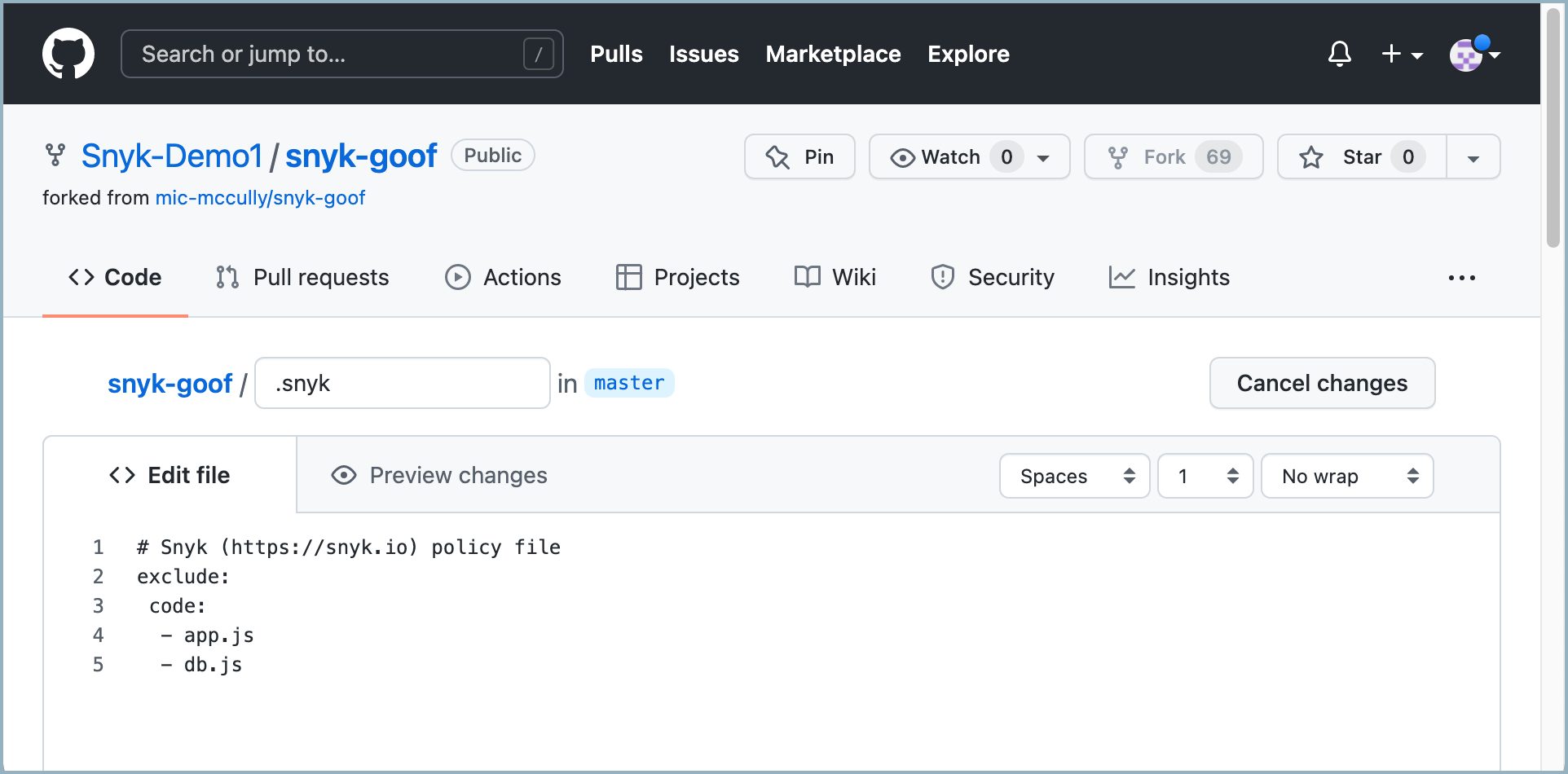
Now you want to exclude the `app.js` and `db.js` files from the Snyk Code analysis. To achieve that, you do the following:
1. You create a `.snyk` file in the `snyk-goof` repository in GitHub.
.snyk file in snyk-goof repository
2. In the `.snyk` file, you enter the following commands to exclude the `app.js` and `db.js` files from the import.
.snyk file commands
3. You retest the `snyk-goof` repository by clicking **Retest now** on the **Code Analysis** page for the repository.
The `app.js` and `db.js` files are excluded from the retest. They are not tested by Snyk Code and do not appear in the Code Analysis results. Now, only five vulnerability issues are detected.
Detected issues after files have been excluded
---
# Agent Instructions
This documentation is published with GitBook. GitBook is the documentation platform designed so that both humans and AI agents can read, navigate, and reason over technical content effectively. Learn more at gitbook.com.
## Querying This Documentation
If you need additional information that is not directly available in this page, you can query the documentation by asking a question.
Perform an HTTP GET request on the following URL with the `ask` and `goal` query parameters:
```
GET https://docs.snyk.io/scan-fix-and-prevent/scan-with-snyk/snyk-projects/import-project-repository/exclude-directories-and-files-from-project-import.md?ask=&goal=
```
`ask` is the immediate question: it should be specific, self-contained, and written in natural language.
`goal` is what the user is ultimately trying to achieve, the reason they need the answer. Sharing it helps GitBook give you a better, more relevant answer. A goal is most helpful when it describes the outcome the user wants rather than restating the question. For example, with `ask=how do I create an API token`, a goal like `automate deployments from our CI pipeline` lets GitBook tailor the answer to that use case.
The response will contain a direct answer to the question and relevant excerpts and sources from the documentation.
Use this mechanism when the answer is not explicitly present in the current page, you need clarification or additional context, or you want to retrieve related documentation sections.


.png?alt=media)