> For the complete documentation index, see [llms.txt](https://docs.snyk.io/llms.txt). Markdown versions of documentation pages are available by appending `.md` to page URLs; this page is available as [Markdown](https://docs.snyk.io/developer-tools/snyk-cli/scan-and-maintain-projects-using-the-cli/scan-all-unmanaged-jar-files.md).
# Scan all unmanaged JAR files
How to scan all unmanaged JAR files with the Snyk CLI
{% hint style="info" %}
**Snyk is rolling out a new navigation.** The steps on this page describe the classic interface. If your view looks different, visit [Navigate the Snyk Web UI](https://docs.snyk.io/navigate-the-snyk-web-ui#where-things-moved) to map these options to the new interface.
{% endhint %}
## Scan all unmanaged JAR files
The Snyk CLI can scan unmanaged JAR files in [Java applications](https://docs.snyk.io/supported-languages/supported-languages-list/java-and-kotlin) to identify which open-source package they contain.
The CLI identifies the package name, version, and vulnerabilities only if the package is available in Maven Central, and the JAR file hash matches the hash in Maven Central.
**Prerequisite**: You must install a [supported version](https://docs.snyk.io/supported-languages/supported-languages-list/java-and-kotlin#supported-package-managers-and-package-registries) of Maven to scan unmanaged JAR files.
### Scanning all JAR files in a single folder and scanning each JAR file individually
To scan each JAR file individually, use the following command:
`snyk test --scan-unmanaged --file=/path/to/file`
When you test each JAR file individually, the name of the JAR file that was scanned appears on the Snyk web UI.
**WAR file support**: You can scan individual WAR files that are published in Maven Central. To scan open-source dependency JARs directly, you must extract (unzip) all other WAR files or JAR files containing other JARs.
### Recursively scanning all subfolders
{% hint style="warning" %}
**The method described here is deprecated.**
Beginning with Snyk CLI 1.1176.0, by default you can scan all subfolders using the `--scan-all-unmanaged` option. When you scan using --`scan-all-unmanaged`, the package name appears rather than the file name.
{% endhint %}
Java apps often have JAR files in a number of different folders within an application.
The following is a Linux/Mac Bash script used with CLI versions before Snyk CLI 1.1176.0 that recurses through all subfolders starting with the current folder and tests each JAR file found.
Setting a value for the `REMOTE_REPO_URL` variable is important; it is used to combine all scan results under a single Snyk Project in the UI using the `--remote-repo-url` parameter.
```
#!/bin/bash
SNYK_CLI_BINARY_NAME=snyk-cli
SNYK_CLI_BINARY_LOCATION=https://github.com/snyk/cli/releases/latest/download/
REMOTE_REPO_URL= #Insert desired project name in Snyk UI here
detected_jars=""
undetected_jars=""
detected_count=0
undetected_count=0
[[ -z "$REMOTE_REPO_URL" ]] && { echo "REMOTE_REPO_URL is empty. Please enter REMOTE_REPO_URL (line 6) and re-run script." ; exit 1; }
#Download Snyk binary specific to OS (MacOS or Linux)
case "$(uname -s)" in
Darwin)
curl -L -O $SNYK_CLI_BINARY_LOCATION/snyk-macos
mv snyk-macos snyk-cli
;;
Linux)
curl -L -O $SNYK_CLI_BINARY_LOCATION/snyk-linux
mv snyk-linux snyk-cli
;;
esac
chmod +x $SNYK_CLI_BINARY_NAME
#Loop through folders recursively to find all .jar files
#NOTE: will ERROR on files with whitespace in name or contained in directories with whitespace in name
for file in $(find . -type f -name '*.jar' | uniq)
do
echo ""
echo "=-=-=-=-=-=-=-=-=-=-=-=-=-=-=-=-=-=-=-=-=-="
echo $file
echo "=-=-=-=-=-=-=-=-=-=-=-=-=-=-=-=-=-=-=-=-=-="
#Execute Snyk monitor for each .jar
if (./$SNYK_CLI_BINARY_NAME monitor --scan-unmanaged --file=$file --project-name=$file --remote-repo-url=$REMOTE_REPO_URL) then
detected_jars+=$file'\n'
let detected_count++
else
undetected_jars+=$file'\n'
let undetected_count++
fi
done
#Output metrics to the console
echo ""
echo ""
echo ""
echo "=-=-=-=-=-=-=-=-=-=-=-=-=-=-=-=-=-=-=-=-=-="
echo "Detected jars ($detected_count) - does not include transitive dependencies:"
echo ""
if [ ${detected_count} -gt 0 ]; then
printf "${detected_jars}"
fi
echo ""
echo ""
echo ""
echo "=-=-=-=-=-=-=-=-=-=-=-=-=-=-=-=-=-=-=-=-=-="
echo "Undetected jars ($undetected_count) - not found on Maven Central:"
echo ""
if [ ${undetected_count} -gt 0 ]; then
printf "${undetected_jars}"
fi
```
The following is a Windows batch script for scanning JARs in all subfolders, run from a `scanjar.bat` file.
To use this script, you must have installed the Snyk CLI.
```batch
REM Usage:
REM For example: scanjar.bat "C:\workspace\app" "myapp"
SET WORKSPACE=%1
SET REMOTE_REPO_URL=%2
for /R %WORKSPACE% %%f in (*.jar) do cmd /c snyk monitor --scan-unmanaged --remote-repo-url=%REMOTE_REPO_URL% --file=%%f --project-name=%%f
```
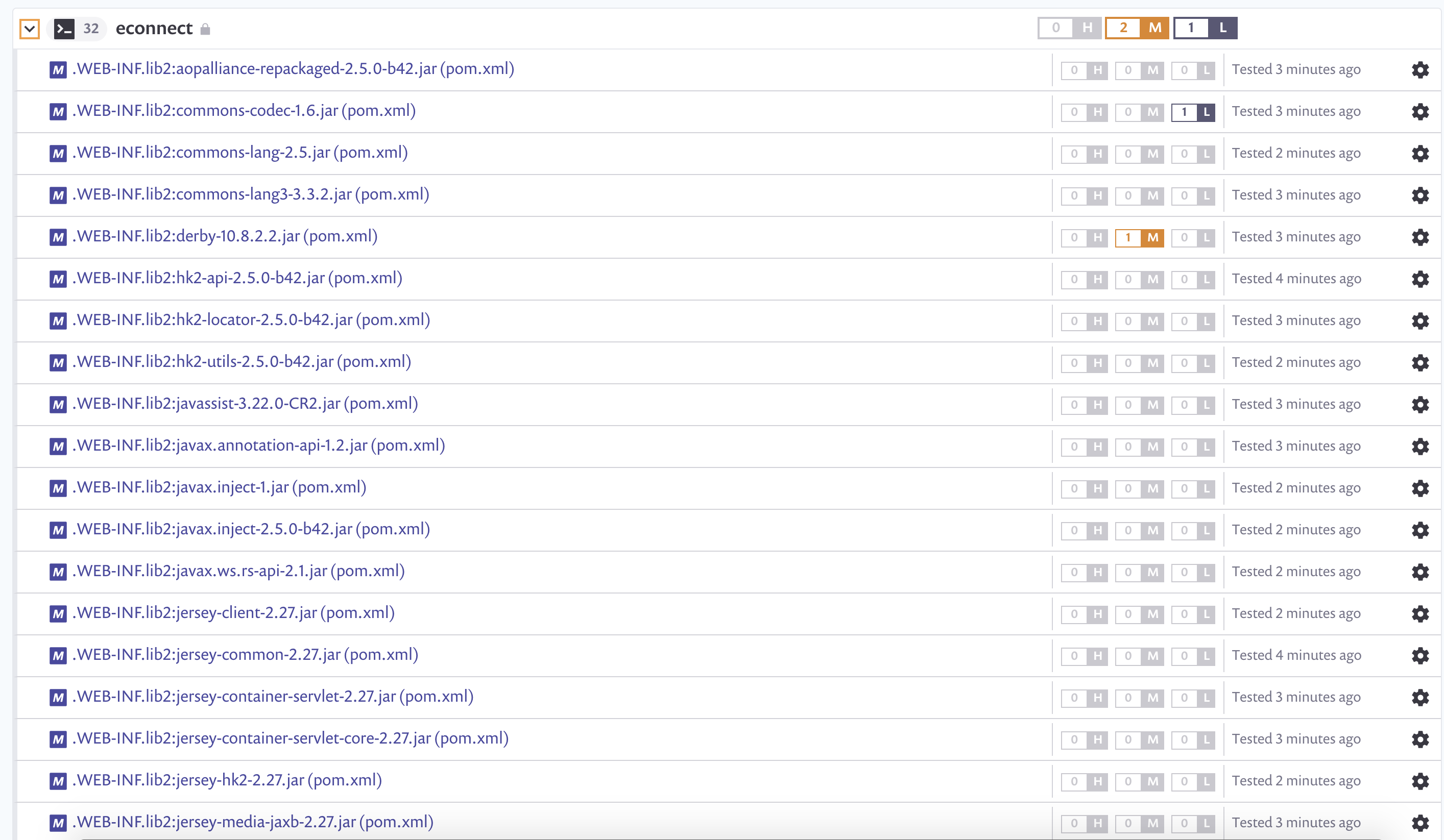
An example follows of the result shown in the Snyk UI after you use these scripts with `REMOTE_REPO_URL` set to "econnect".
Result of scanning unmanaged JAR files
---
# Agent Instructions
This documentation is published with GitBook. GitBook is the documentation platform designed so that both humans and AI agents can read, navigate, and reason over technical content effectively. Learn more at gitbook.com.
## Querying This Documentation
If you need additional information that is not directly available in this page, you can query the documentation by asking a question.
Perform an HTTP GET request on the following URL with the `ask` and `goal` query parameters:
```
GET https://docs.snyk.io/developer-tools/snyk-cli/scan-and-maintain-projects-using-the-cli/scan-all-unmanaged-jar-files.md?ask=&goal=
```
`ask` is the immediate question: it should be specific, self-contained, and written in natural language.
`goal` is what the user is ultimately trying to achieve, the reason they need the answer. Sharing it helps GitBook give you a better, more relevant answer. A goal is most helpful when it describes the outcome the user wants rather than restating the question. For example, with `ask=how do I create an API token`, a goal like `automate deployments from our CI pipeline` lets GitBook tailor the answer to that use case.
The response will contain a direct answer to the question and relevant excerpts and sources from the documentation.
Use this mechanism when the answer is not explicitly present in the current page, you need clarification or additional context, or you want to retrieve related documentation sections.