> For the complete documentation index, see [llms.txt](https://docs.snyk.io/llms.txt). Markdown versions of documentation pages are available by appending `.md` to page URLs; this page is available as [Markdown](https://docs.snyk.io/platform-administration/snyk-hierarchy/usage-settings.md).
# Usage settings
How to view Snyk usage details for your Group or Organization, including tests and contributing developers
{% hint style="info" %}
**Snyk is rolling out a new navigation.** The steps on this page describe the classic interface. If your view looks different, visit [Navigate the Snyk Web UI](https://docs.snyk.io/navigate-the-snyk-web-ui#where-things-moved) to map these options to the new interface.
{% endhint %}
## Usage settings
In your Group or Organization, select **Settings** > **Usage** to view Snyk usage details for your Group or Organization:
* **Test usage**: the number of tests used
* **Contributing developers**: the number of developers contributing to Projects
{% hint style="info" %}
For more information about test frequency settings, see [Project actions](https://docs.snyk.io/scan-fix-and-prevent/scan-with-snyk/snyk-projects#project-actions-on-the-project-listing-page) on the Project Listings page, where bulk actions are also explained.
{% endhint %}
### Test usage
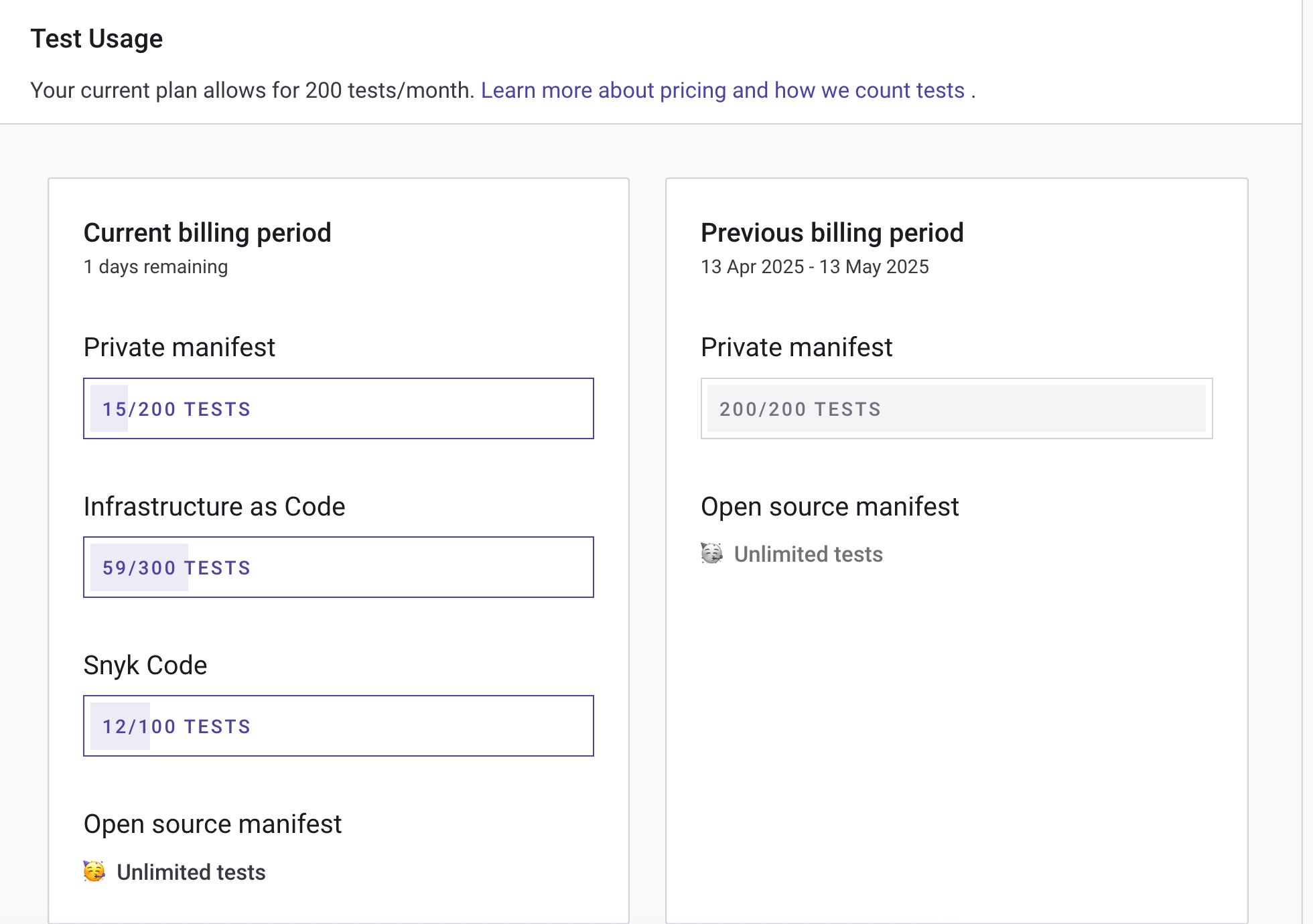
The **Test Usage** section shows how many tests you are using over the current billing period:
Test usage data
{% hint style="info" %}
Test limits vary for Snyk products and plans.
For the Free plan, the limits are: Open Source, 400 tests; Code, 100 tests; IaC, 300 tests; Container, 100 tests.
To see the limits that apply to you and how much of them you have used, open **Usage** in your Organization settings. On an Enterprise plan, your limits are set by your contract rather than published here; your Snyk account team can confirm them. See the [Plans and pricing page](https://snyk.io/plans/) for more details. See [What counts as a test?](https://docs.snyk.io/snyk-data-and-governance/what-counts-as-a-test) for details of how Snyk counts tests.
{% endhint %}
### Contributing developers
Snyk defines contributing developers as developers having made a commit to a private repo monitored by Snyk in the last 90 days.
The **Contributing developers for SCM and CLI integrations** section shows contributing developer counts, both at the Organization level and the Group level.
The developer count is the number of developers who have contributed to the default branch of any private repository connected to an integration.
Snyk does not count contributions to public (open-source) repos because the pricing model is based on the number of contributing developers to private repositories.
The contributing developers count shows:
* **Total unique contributors across all integrations:** the number of contributors across all the integrations in your Snyk account. Contributing developers are only counted once, even if they have contributed to multiple integrations or multiple repositories.
* **Breakdown by integration**: the number of contributors, Organizations, and repos in that integration.
A contributor is recognized through the author email field, set in the local Git settings.
### Billing and Usage
{% hint style="info" %}
The Billing and Usage menu is available only to Tenant Admins on the Snyk Credits plan and the Snyk Platform Access plan (excluding new customer enrollments).
For more information on billable events and credits for the Snyk Credits plan, visit [Policies](https://snyk.io/policies/credit-based-billing/).\
For more information on billable events and credits for the Snyk Platform Access plan, visit [Policies](https://snyk.io/policies/definition-of-snyk-platform-access/).
{% endhint %}
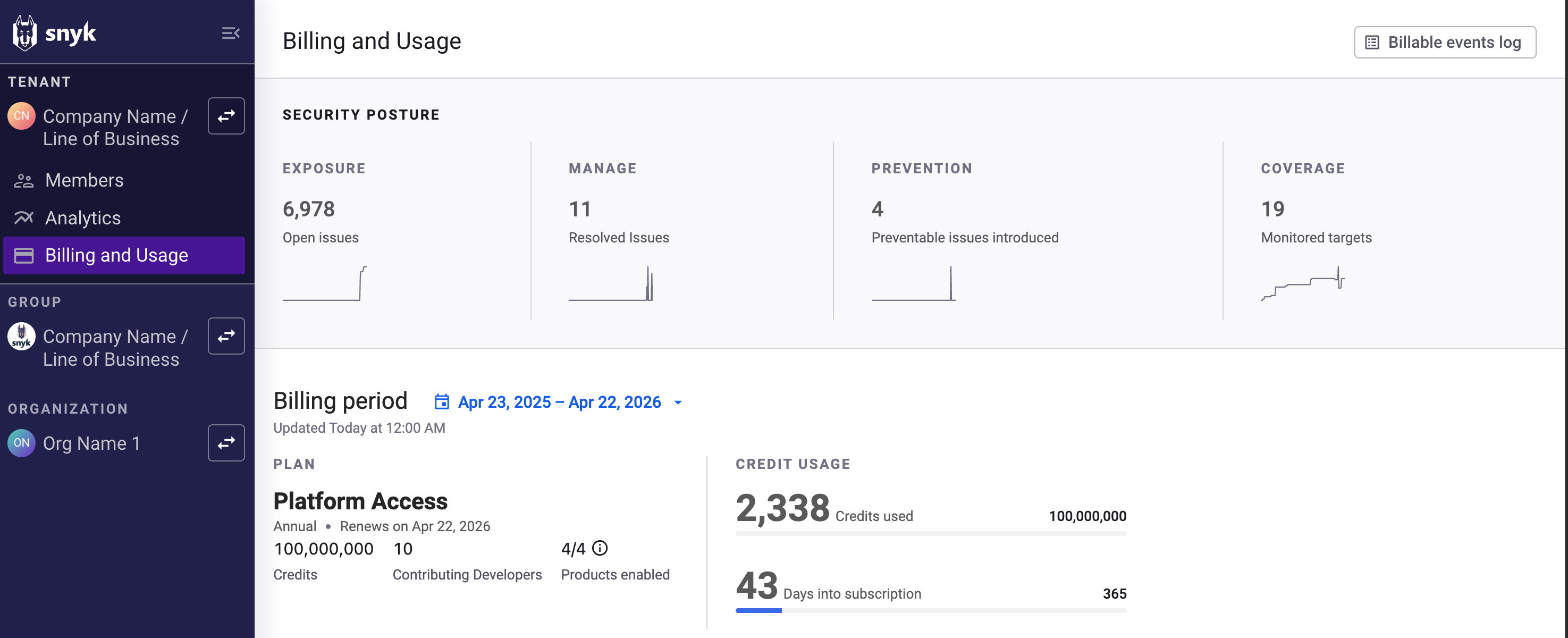
At the Tenant level, navigate to **Billing and Usage** to view credit consumption and usage patterns across all Groups and Organizations within the selected Tenant. The **Billing and Usage** dashboard also provides an overview of which Snyk products and Projects consume your credits.
Billing and Usage dashboard
The **Billing and Usage** dashboard provides the following information:
* **Billing period**
* **Platform Access:** the number of available credits per billing period, the number of contributing developers, and the Snyk products enabled. To see which Snyk products are enabled, hover over the information button.
{% hint style="info" %}
You may need to enable certain capabilities at the Tenant level to begin using Snyk. Capability enablement can be done in the Snyk Web UI through your Tenant’s **Settings** page in the navigation panel.
{% endhint %}
* **Credit usage:** the number of credits used so far and the number of days left on your subscription.
* **Billable events log:** a detailed list of all billable events.
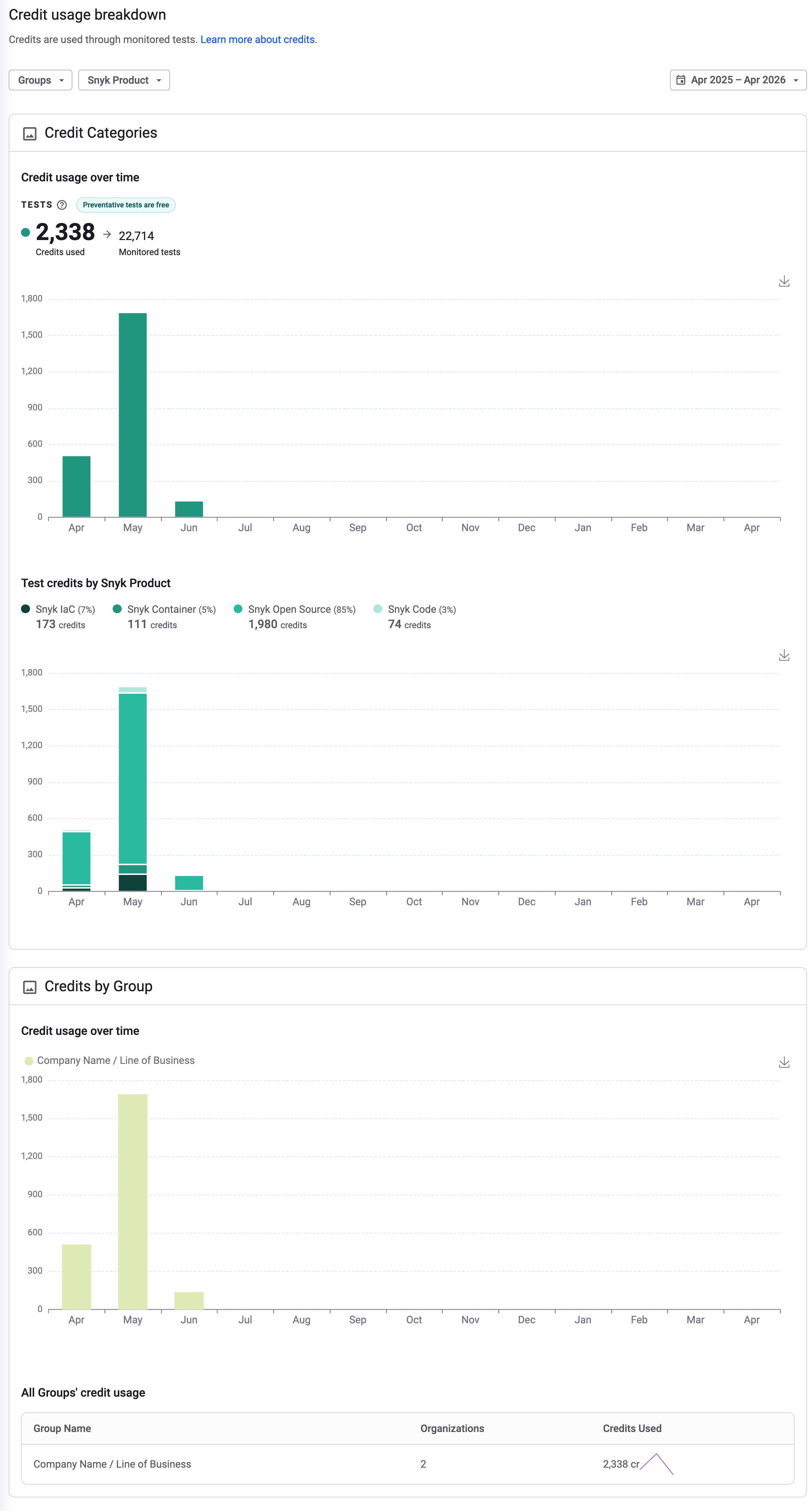
You can also see a breakdown of your credit usage and filter the information by Group, Snyk product, or date range.
Example of credit usage breakdown
---
# Agent Instructions
This documentation is published with GitBook. GitBook is the documentation platform designed so that both humans and AI agents can read, navigate, and reason over technical content effectively. Learn more at gitbook.com.
## Querying This Documentation
If you need additional information that is not directly available in this page, you can query the documentation by asking a question.
Perform an HTTP GET request on the following URL with the `ask` and `goal` query parameters:
```
GET https://docs.snyk.io/platform-administration/snyk-hierarchy/usage-settings.md?ask=&goal=
```
`ask` is the immediate question: it should be specific, self-contained, and written in natural language.
`goal` is what the user is ultimately trying to achieve, the reason they need the answer. Sharing it helps GitBook give you a better, more relevant answer. A goal is most helpful when it describes the outcome the user wants rather than restating the question. For example, with `ask=how do I create an API token`, a goal like `automate deployments from our CI pipeline` lets GitBook tailor the answer to that use case.
The response will contain a direct answer to the question and relevant excerpts and sources from the documentation.
Use this mechanism when the answer is not explicitly present in the current page, you need clarification or additional context, or you want to retrieve related documentation sections.