> For the complete documentation index, see [llms.txt](https://docs.snyk.io/llms.txt). Markdown versions of documentation pages are available by appending `.md` to page URLs; this page is available as [Markdown](https://docs.snyk.io/scan-fix-and-prevent/scan-with-snyk/snyk-open-source/package-repository-integrations/private-gem-sources-for-ruby-configuration.md).
# Private gem sources for Ruby configuration
How to configure private gem sources for Ruby with Snyk
{% hint style="info" %}
**Snyk is rolling out a new navigation.** The steps on this page describe the classic interface. If your view looks different, visit [Navigate the Snyk Web UI](https://docs.snyk.io/navigate-the-snyk-web-ui#where-things-moved) to map these options to the new interface.
{% endhint %}
## Private gem sources for Ruby configuration
{% hint style="info" %}
**Feature availability**\
This functionality is in beta. [Contact Snyk Support](https://support.snyk.io) to have it enabled for your Organization.
This guide is relevant for Snyk UI integrations only. The CLI supports Ruby Projects with private registries without extra configuration.
{% endhint %}
You can add a configuration to tell Snyk where your private gems are hosted. This is the same information you would normally add as a Bundler environment variable.
After you have added this configuration, Snyk uses the information to access private dependencies when creating Pull/Merge Requests, by allowing Bundler to reach those dependencies in order to regenerate the lockfile.
### Configuration of private gem sources for Ruby
1. Navigate to **Settings** > **General**.
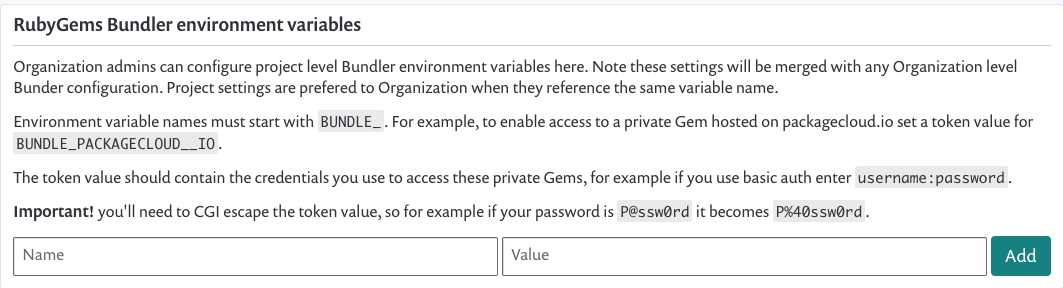
2. Find the `RubyGems Bundler environment variables` section; see the screen illustration.
3. Add environment variable names and values to define credentials for gem sources.\
These are generally the same as the values you set on your developer machine, in your CI environments, or both.\
Example name: `BUNDLE_GITHUB__COM`, Value: `abcd0123generatedtoken:x-oauth-basic`
4. To test the configuration, open a Pull/Merge Request on a Project that contains gems from your private registries to see a lockfile updated and included in the Snyk Fix Pull Request.
RubyGems Bundler environment variables
### Requirements for configuration of private gem sources for Ruby
A list of requirements follows:
* Variable values must be CGI escaped.
* Gem sources must use `https` URLs.\
Example: Supported: `gem "privvy", git: "https://github.com/testexample/ruby-gem-for-private-source"`\
Not supported**:** `gem "privvy", git: "git@github.com:testexample/ruby-gem-for-private-source"`
* Gem sources must be publicly resolvable, that is, not behind a firewall.
* Variables must be configured according to the [Bundler Credentials for Gem Sources documentation](https://bundler.io/v1.16/bundle_config.html#CREDENTIALS-FOR-GEM-SOURCES).
---
# Agent Instructions
This documentation is published with GitBook. GitBook is the documentation platform designed so that both humans and AI agents can read, navigate, and reason over technical content effectively. Learn more at gitbook.com.
## Querying This Documentation
If you need additional information that is not directly available in this page, you can query the documentation by asking a question.
Perform an HTTP GET request on the following URL with the `ask` and `goal` query parameters:
```
GET https://docs.snyk.io/scan-fix-and-prevent/scan-with-snyk/snyk-open-source/package-repository-integrations/private-gem-sources-for-ruby-configuration.md?ask=&goal=
```
`ask` is the immediate question: it should be specific, self-contained, and written in natural language.
`goal` is what the user is ultimately trying to achieve, the reason they need the answer. Sharing it helps GitBook give you a better, more relevant answer. A goal is most helpful when it describes the outcome the user wants rather than restating the question. For example, with `ask=how do I create an API token`, a goal like `automate deployments from our CI pipeline` lets GitBook tailor the answer to that use case.
The response will contain a direct answer to the question and relevant excerpts and sources from the documentation.
Use this mechanism when the answer is not explicitly present in the current page, you need clarification or additional context, or you want to retrieve related documentation sections.