> For the complete documentation index, see [llms.txt](https://docs.snyk.io/llms.txt). Markdown versions of documentation pages are available by appending `.md` to page URLs; this page is available as [Markdown](https://docs.snyk.io/scan-fix-and-prevent/scan-with-snyk/snyk-container/scan-your-dockerfile/detect-vulnerable-base-images-from-your-dockerfile.md).
# Detect vulnerable base images from your Dockerfile
How to detect vulnerable base images from your Dockerfile
{% hint style="info" %}
You can add a single Dockerfile to each image that you have imported.
{% endhint %}
## Prerequisites for adding a Dockerfile
To receive base image fix advice, including major, minor, and alternative upgrades, as well as advice when you need to rebuild your image, ensure you:
* Have configured your preferred Git repository
* Have imported the repository that contains the relevant Dockerfile.
## Add a Dockerfile
To add a Dockerfile for additional fix advice:
1. In the **Projects** tab, find your Project by using a filter and navigate to the Project page.
2. On the Project page, navigate to **Settings**.
3. On the **Settings** page, under **Dockerfile**, click **Configure Dockerfile** and select the relevant Git repository from the dropdown.
Configure Dockerfile
4. On the page listing the available repositories, select the relevant repository which contains your Dockerfile.
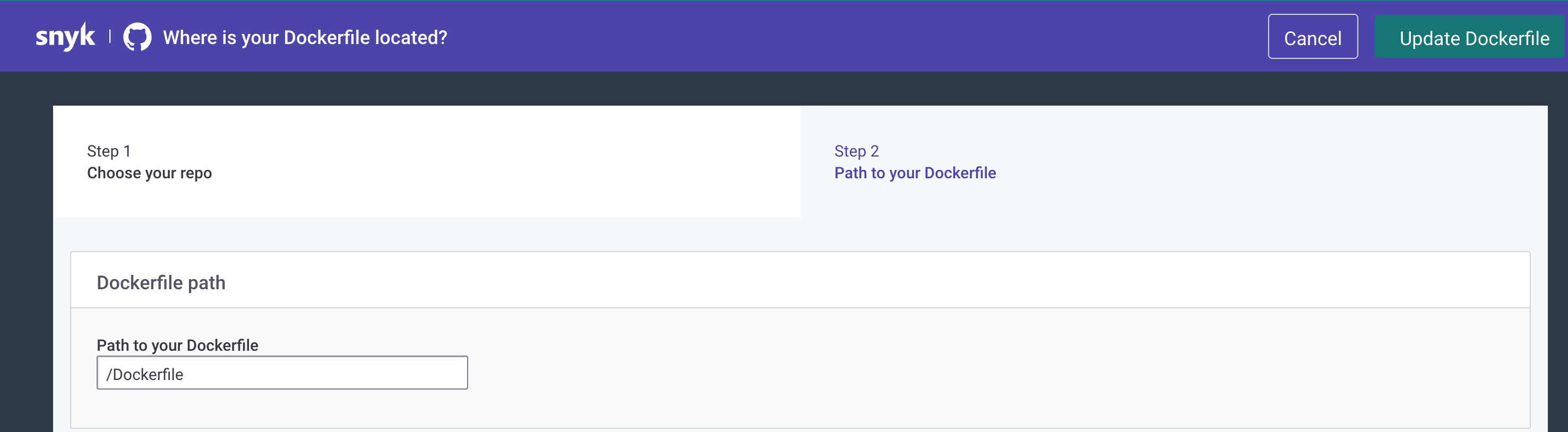
5. Under **Path to your Dockerfile**, add the relative path to your Dockerfile, in the following format: /path/dockerfile.
Add the path to your Dockerfile
6. Click **Update your Dockerfile**.
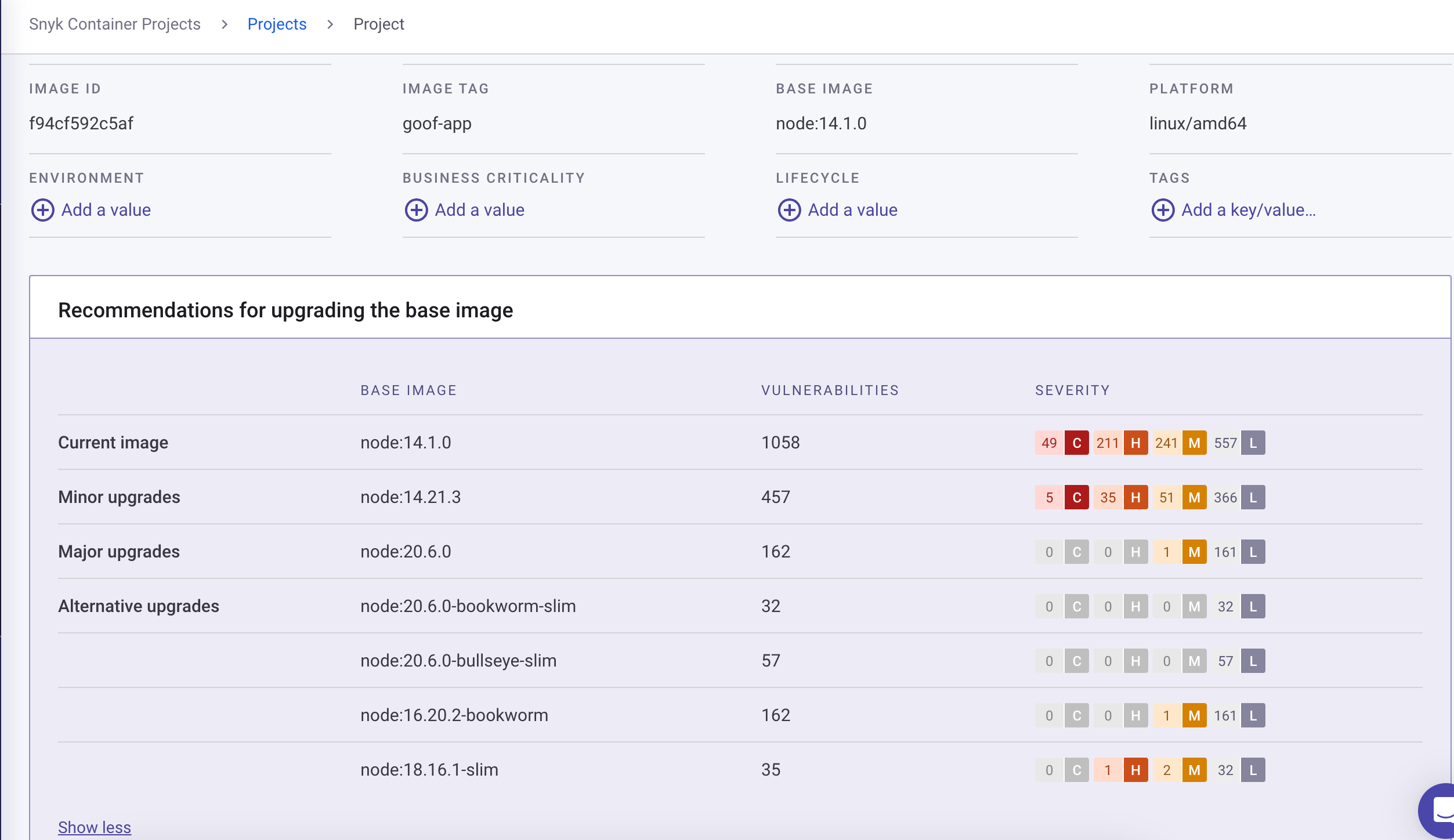
Snyk scans the Project again and provides relevant base image fix advice. You can see the fix advice on the Project page, under **Recommendations for upgrading the base image.**
The following information is displayed: **Current image**, **Minor upgrades**, **Major Upgrades**, **Alternative upgrades**, the number of vulnerabilities for each, and a severity ranking.
Recommendations for upgrading the base image
## Scan the base image from a Dockerfile
Snyk detects vulnerable base images by scanning your Dockerfile when you import a Git repository. This allows you to examine security issues before building the image and thus helps solve potential problems before they land in your registry or in production.
{% hint style="info" %}
When scanning Dockerfiles, Snyk can provide vulnerability information and base image recommendations for supported base images. If you need help, contact [Snyk Support](https://support.snyk.io).
{% endhint %}
After you [integrate your Git repository with Snyk](/developer-tools/integrations/scm-integrations/organization-level-integrations.md), any Dockerfiles in that repository are automatically identified and shown in the Web UI as Projects.
Dockerfiles displayed in the Project list
For details about detecting vulnerable base images in containers and fix recommendations, see [Detect the container base image](/scan-fix-and-prevent/scan-with-snyk/snyk-container/use-snyk-container/detect-the-container-base-image.md).
---
# Agent Instructions
This documentation is published with GitBook. GitBook is the documentation platform designed so that both humans and AI agents can read, navigate, and reason over technical content effectively. Learn more at gitbook.com.
## Querying This Documentation
If you need additional information that is not directly available in this page, you can query the documentation dynamically by asking a question.
Perform an HTTP GET request on the current page URL with the `ask` query parameter, and the optional `goal` query parameter:
```
GET https://docs.snyk.io/scan-fix-and-prevent/scan-with-snyk/snyk-container/scan-your-dockerfile/detect-vulnerable-base-images-from-your-dockerfile.md?ask=&goal=
```
`ask` is the immediate question: it should be specific, self-contained, and written in natural language.
`goal` is optional and describes the broader end goal you are ultimately trying to accomplish on behalf of the user. GitBook uses it to tailor the answer towards what is most useful for that goal.
The response will contain a direct answer to the question and relevant excerpts and sources from the documentation.
Use this mechanism when the answer is not explicitly present in the current page, you need clarification or additional context, or you want to retrieve related documentation sections.