> For the complete documentation index, see [llms.txt](https://docs.snyk.io/llms.txt). Markdown versions of documentation pages are available by appending `.md` to page URLs; this page is available as [Markdown](https://docs.snyk.io/scan-fix-and-prevent/scan-with-snyk/snyk-container/kubernetes-integration/overview-of-kubernetes-integration.md).
# Overview of Kubernetes integration
Overview of the Snyk Kubernetes integration
{% hint style="info" %}
**Snyk is rolling out a new navigation.** The steps on this page describe the classic interface. If your view looks different, visit [Navigate the Snyk Web UI](https://docs.snyk.io/navigate-the-snyk-web-ui#where-things-moved) to map these options to the new interface.
{% endhint %}
## Overview of Kubernetes integration
{% hint style="info" %}
**Feature availability**\
Kubernetes integration is available only with Enterprise plans. For more information, see [plans and pricing](https://snyk.io/plans/).
{% endhint %}
Snyk is able to integrate with Kubernetes, enabling you to import and scan your running workloads. This helps you identify vulnerabilities in their associated images and configurations that can make those workloads less secure. After workloads are imported, Snyk continues to monitor them and to identify additional security issues as new images are deployed and the workload configuration changes.
### **How Kubernetes integration works**
Kubernetes integration follows this process:
1. Your administrator installs a controller on your cluster, authenticating the integration with a unique integration ID and a service account token with the needed permissions generated from your Snyk account. For more information, including the permissions needed, see [Prerequisites for installing the Snyk Controller](/scan-fix-and-prevent/scan-with-snyk/snyk-container/kubernetes-integration/install-the-snyk-controller.md#prerequisites-for-installing-the-snyk-controller).
2. You install the controller with one of the options:
* [Install the Snyk Controller with Helm (Azure and Google Cloud Platform)](/scan-fix-and-prevent/scan-with-snyk/snyk-container/kubernetes-integration/install-the-snyk-controller/install-the-snyk-controller-with-helm-azure-and-google-cloud-platform.md)
* [Install the Snyk Controller on Amazon Elastic Kubernetes Service (Amazon EKS)](/scan-fix-and-prevent/scan-with-snyk/snyk-container/kubernetes-integration/install-the-snyk-controller/install-the-snyk-controller-on-amazon-elastic-kubernetes-service-amazon-eks.md)
* [Install the Snyk Controller with OpenShift and OperatorHub](/scan-fix-and-prevent/scan-with-snyk/snyk-container/kubernetes-integration/install-the-snyk-controller/install-the-snyk-controller-with-openshift-4-and-operatorhub.md)
3. The Controller communicates with the Kubernetes API to determine which workloads are running on the cluster (for example, the Deployment, ReplicationController, CronJob, and so on), find their associated images, and scan them for vulnerabilities directly on the cluster.
4. For each workload that your collaborators import, Snyk displays the vulnerabilities found in each image, as well as a summary of the configuration issues that have been identified with the workload.
5. Snyk continuously monitors your imported workloads and reports new vulnerabilities it identifies whenever they affect your Projects.
6. Based on your configurations, if vulnerabilities are found, Snyk notifies you through email or Slack so that you can take immediate action.
{% hint style="info" %}
To maintain the health of the database, Snyk removes any information relating to a workload that has not been changed or updated for eight days. This can lead to failure when rescanning the workload.
If an image and its corresponding Project are removed, and you reimport the same workload during the eight days when the metadata still resides in the Snyk database, you can create the Project again.
{% endhint %}
### **The architecture of Snyk and Kubernetes integration**
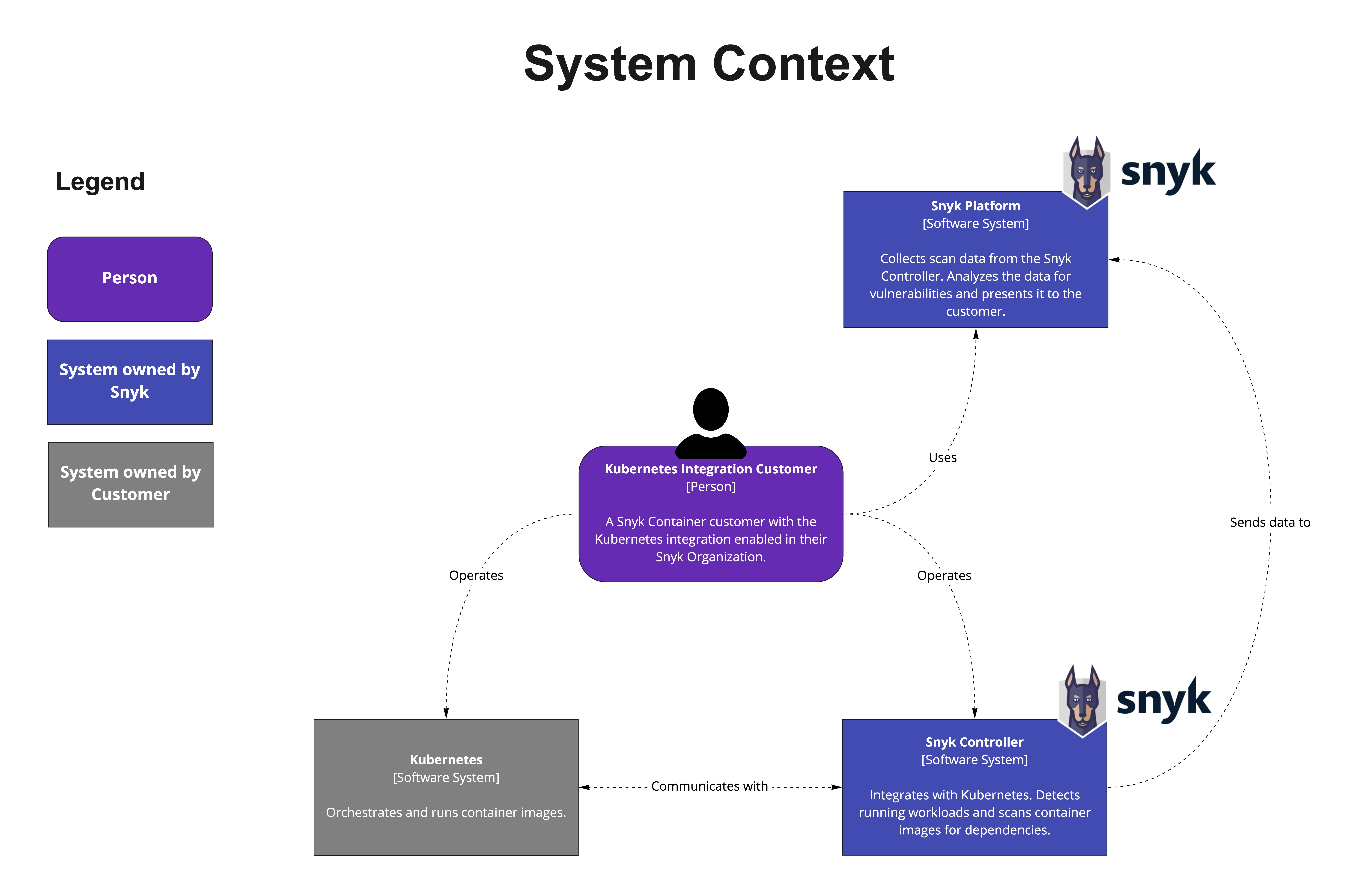
Kubernetes integration architecture diagram
Based on the process exemplified in this diagram:
1. The customer's Snyk Organization is enabled for Kubernetes integration.
2. The customer installs the Snyk Controller into their Kubernetes cluster.
3. The Snyk Controller reads image information and pulls images from container registries.
4. The Snyk Controller scans the images.
5. The Snyk Controller sends scan results to the Snyk Platform to analyze issues.
6. The customer views the vulnerability issues on the Snyk Platform.
### **Terms and conditions**
Snyk Container Kubernetes integration uses Red Hat UBI (Universal Base Image).
Before downloading or using this application, you must agree to the Red Hat subscription agreement located on the [Red Hat website](https://www.redhat.com/en/about/agreements). If you do not agree with these terms, do not download or use the application.
If you have an existing Red Hat Enterprise Agreement (or other negotiated agreement with Red Hat) with terms that govern subscription services associated with Containers, then your existing agreement will be the controlling agreement.
### Kubernetes integration troubleshooting
For troubleshooting information on the Kubernetes integration or the Snyk Controller, as well as for common onboarding errors, see the [Kubernetes integration troubleshooting](https://support.snyk.io/s/article/Kubernetes-Integration-troubleshooting) support page.
---
# Agent Instructions
This documentation is published with GitBook. GitBook is the documentation platform designed so that both humans and AI agents can read, navigate, and reason over technical content effectively. Learn more at gitbook.com.
## Querying This Documentation
If you need additional information that is not directly available in this page, you can query the documentation by asking a question.
Perform an HTTP GET request on the following URL with the `ask` and `goal` query parameters:
```
GET https://docs.snyk.io/scan-fix-and-prevent/scan-with-snyk/snyk-container/kubernetes-integration/overview-of-kubernetes-integration.md?ask=&goal=
```
`ask` is the immediate question: it should be specific, self-contained, and written in natural language.
`goal` is what the user is ultimately trying to achieve, the reason they need the answer. Sharing it helps GitBook give you a better, more relevant answer. A goal is most helpful when it describes the outcome the user wants rather than restating the question. For example, with `ask=how do I create an API token`, a goal like `automate deployments from our CI pipeline` lets GitBook tailor the answer to that use case.
The response will contain a direct answer to the question and relevant excerpts and sources from the documentation.
Use this mechanism when the answer is not explicitly present in the current page, you need clarification or additional context, or you want to retrieve related documentation sections.