> For the complete documentation index, see [llms.txt](https://docs.snyk.io/llms.txt). Markdown versions of documentation pages are available by appending `.md` to page URLs; this page is available as [Markdown](https://docs.snyk.io/scan-fix-and-prevent/scan-with-snyk/snyk-container/container-registry-integrations/integrate-with-amazon-elastic-container-registry-ecr/enable-snyk-permissions-to-access-amazon-elastic-container-registry-ecr-for-the-first-time.md).
# Enable Snyk permissions to access Amazon Elastic Container Registry (ECR) for the first time
How to enable Snyk permissions to access Amazon ECR for the first time
{% hint style="info" %}
**Snyk is rolling out a new navigation.** The steps on this page describe the classic interface. If your view looks different, visit [Navigate the Snyk Web UI](https://docs.snyk.io/navigate-the-snyk-web-ui#where-things-moved) to map these options to the new interface.
{% endhint %}
## Enable Snyk permissions to access Amazon Elastic Container Registry (ECR) for the first time
This process explains how to set up a resource role in AWS and the necessary policies. For additional information, see the [Amazon ECR documentation](https://docs.aws.amazon.com/AmazonECR/latest/userguide/ecr_managed_policies.html).
{% hint style="warning" %}
When you connect to the ECR integration, ensure that the us-east-2 region is activated. This is required for the STS (Security Token Service) to work properly. For more information, see the [related support article](https://support.snyk.io/s/article/Connecting-to-ECR-Integration-gives-error-Could-not-connect-to-ECR-Please-ensure-your-credentials-are-correctly-configured).
{% endhint %}
1. [Log in](https://console.aws.amazon.com/iam/home?#/policies) to the AWS Management Console.
2. Navigate to the IAM service.
3. Navigate to the Policies page to create a policy for the role by updating the related JSON file as follows:
1. Create a new policy.
2. Navigate to the **JSON** tab.
3. Select and delete all of the default text in the JSON file.
4. Copy the script as it is displayed from the UI in your Snyk account and paste it inside the JSON file.
5. Set "AmazonEC2ContainerRegistryReadOnlyForSnyk" as the **Name**.
6. Enter **Provides Snyk with read-only access to Amazon EC2 Container Registry repositories** as the **Description**.
7. Click **Create Policy**.
4. Create a role by which to implement the policy:
1. From the [AWS Management Console](https://aws.amazon.com/console/), navigate to the **Roles** page and create a new role.
2. Select **AWS service** as the trusted entity and **EC2** as the service for this role.
3. Click **Next:permissions**.
4. From the Policies list that is displayed, search for and select the "AmazonEC2ContainerRegistryReadOnlyForSnyk" policy you just created.
5. Skip to the last step (**Review**) of the process.
6. Name the role "SnykServiceRole"**.**
7. Enter "Allows EC2 instances to call Snyk AWS services on your behalf" as the **Description** and then create the role.
5. Harden the usability scope for the role:
1. From the **Roles** page, find and click the link for the role you just created to update its configurations and navigate to the **Trust relationships** tab.
2. Click **Edit trust relationship**.
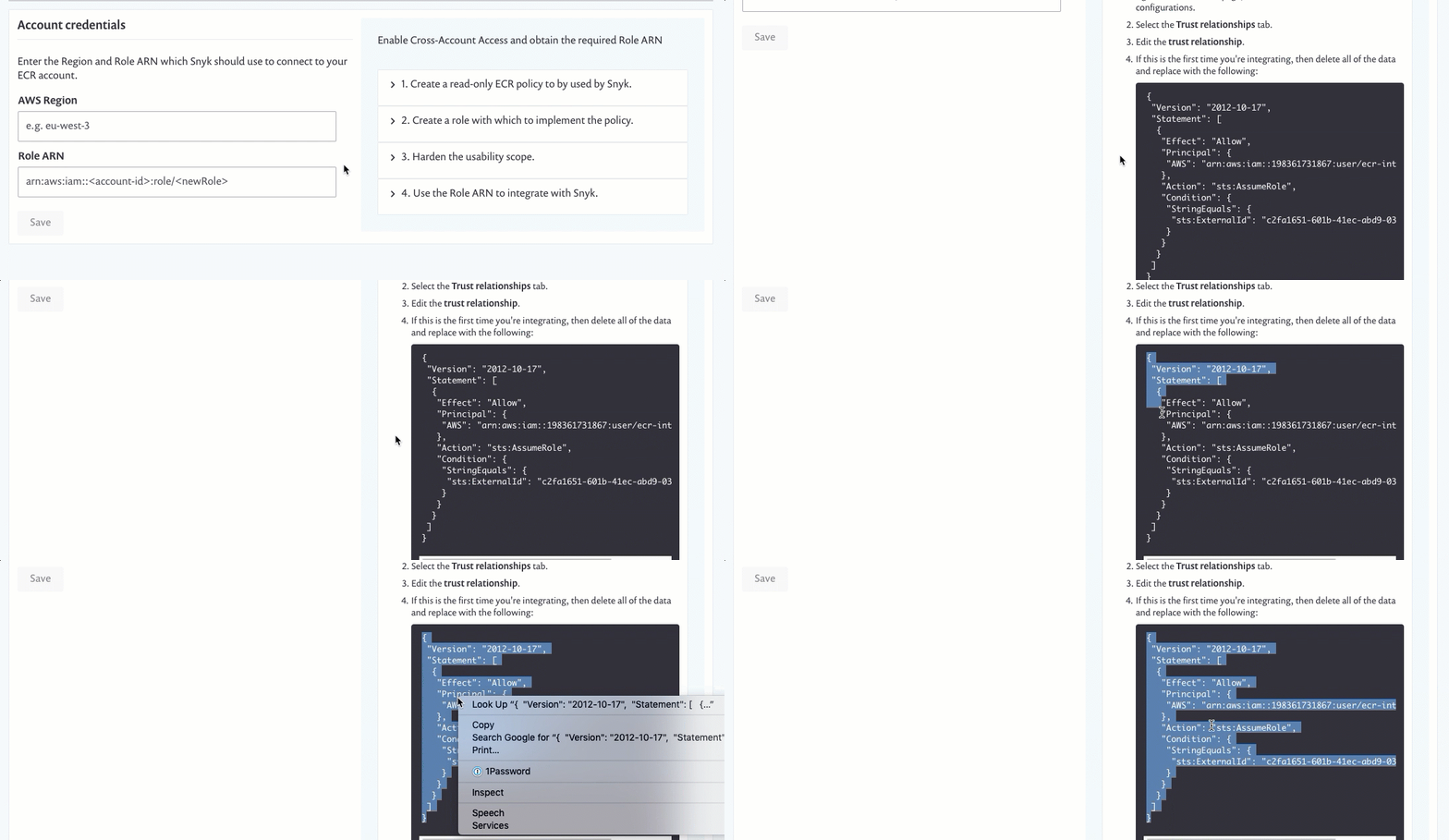
3. In the **Policy Document**, select and delete the entire script and then copy and paste the following script as it is displayed from the UI in your Snyk account, in the Harden usability scope field of the Account credentials.
Enabling Snyk permissions to access Amazon Elastic Container Registry (ECR)
---
# Agent Instructions
This documentation is published with GitBook. GitBook is the documentation platform designed so that both humans and AI agents can read, navigate, and reason over technical content effectively. Learn more at gitbook.com.
## Querying This Documentation
If you need additional information that is not directly available in this page, you can query the documentation by asking a question.
Perform an HTTP GET request on the following URL with the `ask` and `goal` query parameters:
```
GET https://docs.snyk.io/scan-fix-and-prevent/scan-with-snyk/snyk-container/container-registry-integrations/integrate-with-amazon-elastic-container-registry-ecr/enable-snyk-permissions-to-access-amazon-elastic-container-registry-ecr-for-the-first-time.md?ask=&goal=
```
`ask` is the immediate question: it should be specific, self-contained, and written in natural language.
`goal` is what the user is ultimately trying to achieve, the reason they need the answer. Sharing it helps GitBook give you a better, more relevant answer. A goal is most helpful when it describes the outcome the user wants rather than restating the question. For example, with `ask=how do I create an API token`, a goal like `automate deployments from our CI pipeline` lets GitBook tailor the answer to that use case.
The response will contain a direct answer to the question and relevant excerpts and sources from the documentation.
Use this mechanism when the answer is not explicitly present in the current page, you need clarification or additional context, or you want to retrieve related documentation sections.