> For the complete documentation index, see [llms.txt](https://docs.snyk.io/llms.txt). Markdown versions of documentation pages are available by appending `.md` to page URLs; this page is available as [Markdown](https://docs.snyk.io/scan-fix-and-prevent/scan-with-snyk/snyk-api-web/configure-targets/configure-authentication/configure-logout-detection.md).
# Logout detection
How to configure logout detection for Snyk API & Web targets
{% hint style="info" %}
**Snyk is rolling out a new navigation.** The steps on this page describe the classic interface. If your view looks different, visit [Navigate the Snyk Web UI](https://docs.snyk.io/navigate-the-snyk-web-ui#where-things-moved) to map these options to the new interface.
{% endhint %}
## Logout detection
Configure logout detection to help the scanner maintain authenticated sessions throughout the scan.
To effectively scan an application behind its login pages, the scanner must know how to log in and when the session has ended. While some sites make it obvious when the session ends, many do not provide clear indicators for automated systems.
Snyk API & Web has an intelligent mechanism that looks for login selectors after login to determine if the session ended. However, for cases where the site displays text, a button to log back in, or other indicators that automated detection cannot handle reliably, configure logout detection manually.
### Navigate to logout detection settings
1. Log in to your Snyk API & Web account.
2. Navigate to the **Targets** page.
3. Locate the target you want to configure and click the **gear icon** to access the target settings.
4. Select the **Authentication** tab.
5. Scroll down to the **Logout detection** section.
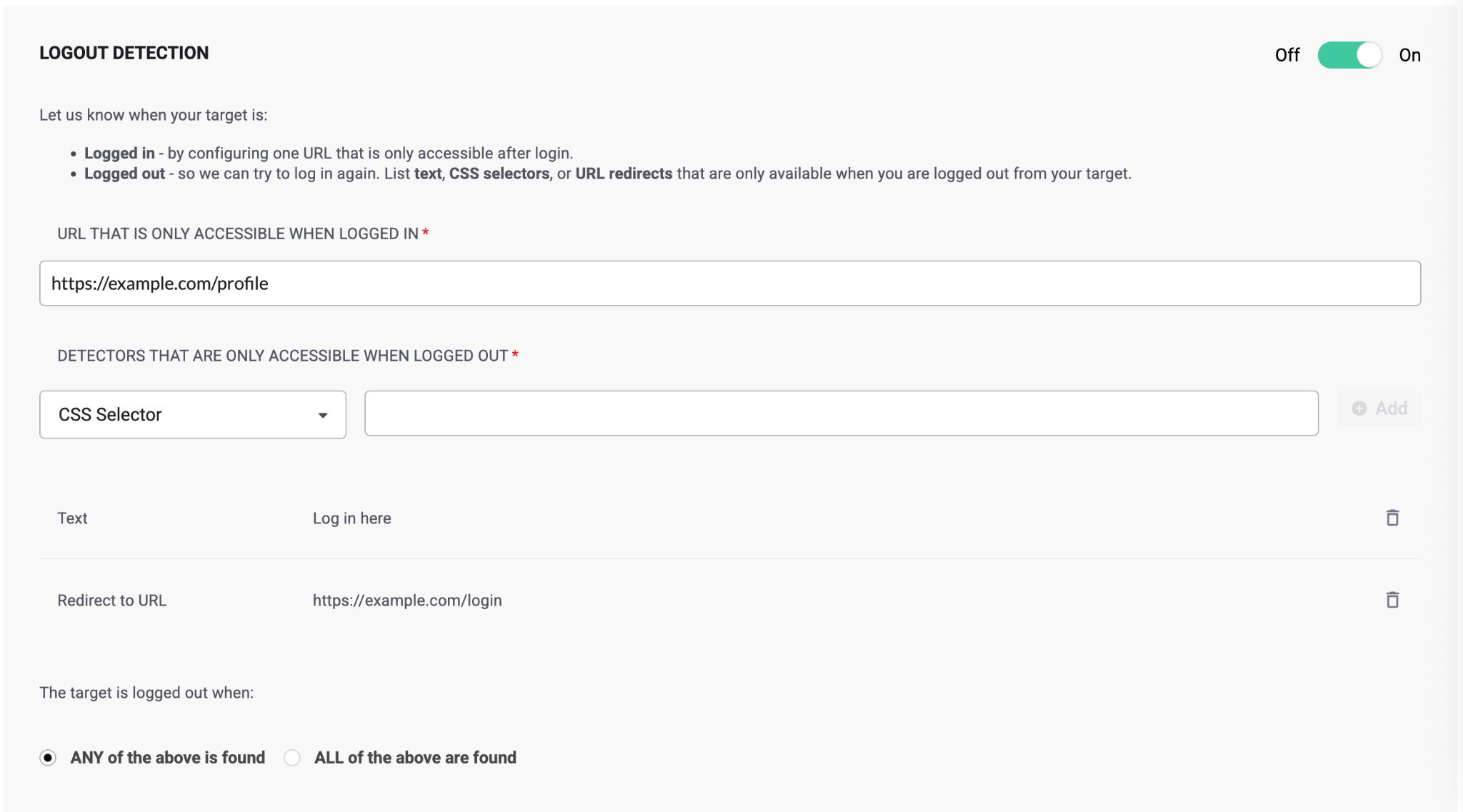
### Configure Web targets
For Web targets, define a URL that is only accessible when logged in, and one or multiple detectors that appear only when logged out. Detectors can be text, CSS selectors, or URL redirects.
After adding multiple detectors, specify whether the target is logged out when **any** of the selectors are found or when **all** of them are found.
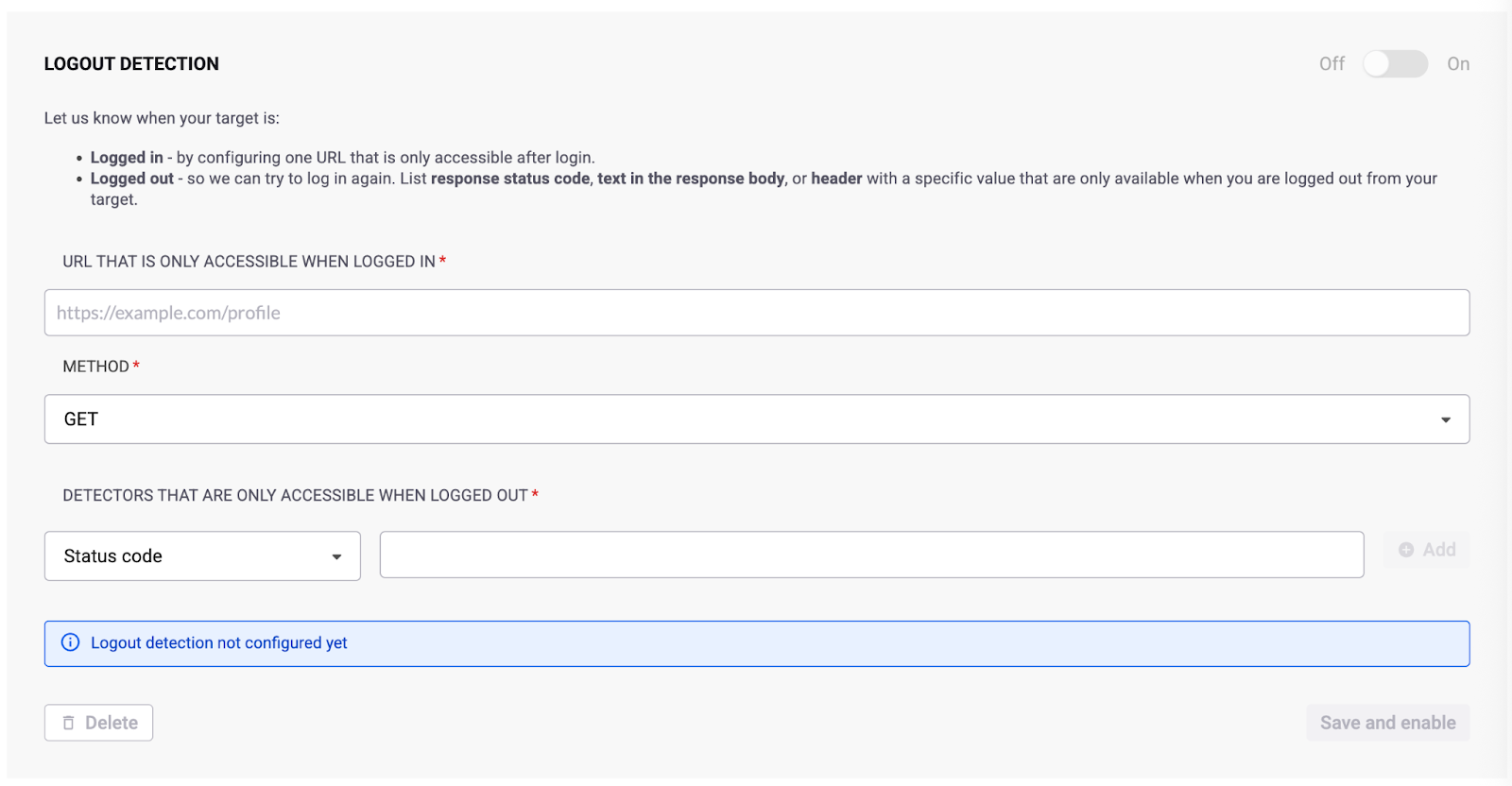
### Configure OpenAPI targets
For OpenAPI targets, define:
* A URL that is only accessible when logged in to the API
* An HTTP method (GET, POST, PATCH, or PUT)
* Authentication media type
* Payload (if the method is not GET)
* One or multiple detectors (status code, text, or header) that appear only when logged out
After adding multiple detectors, specify whether the target is logged out when **any** of the selectors are found or when **all** of them are found.
### Configure Postman targets
For Postman targets, select the folder from the schema file that contains the logout information.
Include a test script on the required endpoints. For example:
```javascript
pm.test("Status code is 200", function () {
pm.response.to.have.status(200);
});
```
---
# Agent Instructions
This documentation is published with GitBook. GitBook is the documentation platform designed so that both humans and AI agents can read, navigate, and reason over technical content effectively. Learn more at gitbook.com.
## Querying This Documentation
If you need additional information that is not directly available in this page, you can query the documentation by asking a question.
Perform an HTTP GET request on the following URL with the `ask` and `goal` query parameters:
```
GET https://docs.snyk.io/scan-fix-and-prevent/scan-with-snyk/snyk-api-web/configure-targets/configure-authentication/configure-logout-detection.md?ask=&goal=
```
`ask` is the immediate question: it should be specific, self-contained, and written in natural language.
`goal` is what the user is ultimately trying to achieve, the reason they need the answer. Sharing it helps GitBook give you a better, more relevant answer. A goal is most helpful when it describes the outcome the user wants rather than restating the question. For example, with `ask=how do I create an API token`, a goal like `automate deployments from our CI pipeline` lets GitBook tailor the answer to that use case.
The response will contain a direct answer to the question and relevant excerpts and sources from the documentation.
Use this mechanism when the answer is not explicitly present in the current page, you need clarification or additional context, or you want to retrieve related documentation sections.