> For the complete documentation index, see [llms.txt](https://docs.snyk.io/llms.txt). Markdown versions of documentation pages are available by appending `.md` to page URLs; this page is available as [Markdown](https://docs.snyk.io/scan-fix-and-prevent/fix/prioritize-issues-for-fixing/ignore-issues.md).

# Ignore issues

How to ignore vulnerabilities and license issues in Snyk

{% hint style="info" %}
**Snyk is rolling out a new navigation.** The steps on this page describe the classic interface. If your view looks different, visit [Navigate the Snyk Web UI](https://docs.snyk.io/navigate-the-snyk-web-ui#where-things-moved) to map these options to the new interface.
{% endhint %}

## Ignore issues

You can ignore a vulnerability or open-source license issue if you do not need to fix it and want to avoid seeing the issue in scan results. You can ignore issues temporarily or permanently and set ignores individually or as actions. By using Snyk ignores you can display results only for issues you need to fix

For Open Source details, see [How to set ignores](#how-to-set-ignores). This information provides a useful background for using ignores with other Snyk scanning methods. For more information, see the following sections on this page:

* [Ignore issues in Snyk Code](#ignore-issues-in-snyk-code)
* [Ignore issues in Snyk Container](#ignore-issues-in-snyk-container)
* [Ignore issues in Snyk IaC](#ignore-issues-in-snyk-iac)

### Decisions to ignore issues

Optimally, it allows you to fix or patch vulnerabilities or remove vulnerable dependencies. However, you may want to suppress an issue for any of the following reasons:

* There is no fix.
* The issue is not relevant to the Project. One example is a distributed denial-of-service (DDoS) attack for an internal service.

It is optimal to fix an issue even if it has a path that makes it non-exploitable. A vulnerability that is not exploitable now may become exploitable in the future.

### How to set ignores

You can view and ignore issues in several ways:

* [Ignore issues in the Snyk Web UI](#ignore-issues-in-the-snyk-web-ui)
* [Ignore issues in the CLI](#ignore-issues-in-the-cli)
* [Scan from the CLI or CI/CD, ignore in the Web UI](#scan-from-the-cli-or-ci-cd-ignore-in-the-web-ui)
* [Use the .snyk file to ignore issues](#use-the-.snyk-file-to-ignore-issues)
* [Use policy actions to ignore issues](#use-policy-actions-to-ignore-issues)

#### Ignore issues in the Snyk Web UI

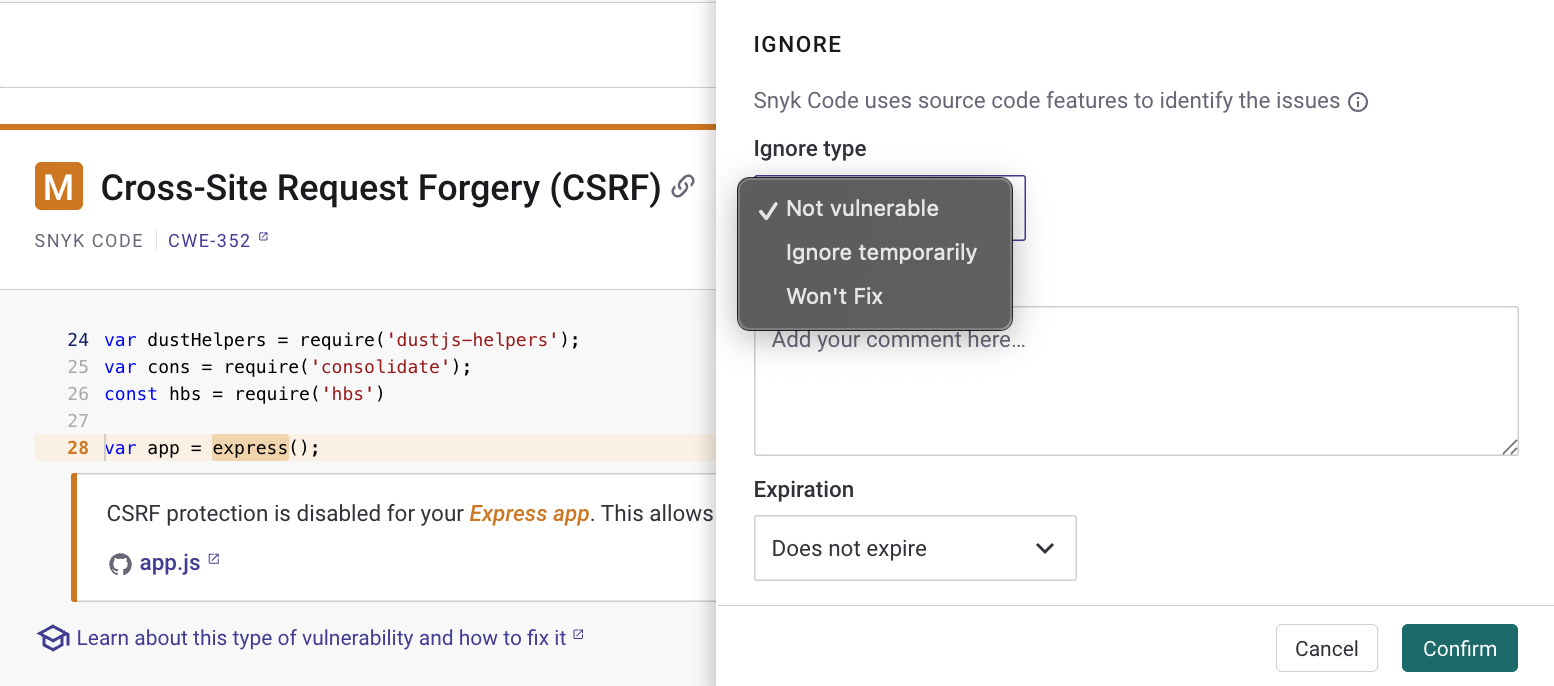
Each issue card has an **Ignore** button that opens a dialog where you can select how or why you want to ignore the issue and how long to ignore it.

<figure><img src="https://2730497224-files.gitbook.io/~/files/v0/b/gitbook-x-prod.appspot.com/o/spaces%2FBJO0IZx7zB6bOkotxQP2%2Fuploads%2Fgit-blob-1d4b8e1491a3755fb7e3425cb3c35dabb9e3a2d9%2FIgnore%20dialog%20from%20issue%20card.png?alt=media" alt="Ignore dialog from issue card"><figcaption><p>Ignore dialog from issue card</p></figcaption></figure>

You can select **Not vulnerable** for any issue that is not exploitable at the time you create the ignore.

If you select **Ignore temporarily,** then you can check the **Until fix is available** checkbox:

<figure><img src="https://2730497224-files.gitbook.io/~/files/v0/b/gitbook-x-prod.appspot.com/o/spaces%2FBJO0IZx7zB6bOkotxQP2%2Fuploads%2Fgit-blob-38f78e4e7fc4816eba855cd75342dcab1cb5e47d%2Fimage%20(185).png?alt=media" alt="Ignore temporarily"><figcaption><p>Ignore temporarily</p></figcaption></figure>

This is checked by default if no fix is available for the issue. The vulnerability resurfaces as soon as Snyk has a fix for it, and optionally you can provide additional details on why you are ignoring the issue.

{% hint style="info" %}
An issue is ignored until either of these conditions occurs: the ignore period expires, or the vulnerability becomes fixable.

An issue ignored in an Open Source or Code Project in the Snyk web UI will be reflected and not flagged in any subsequent [PR checks](/scan-fix-and-prevent/prevent/pull-request-checks.md) across all branches of the Project.
{% endhint %}

When you ignore an issue in the Snyk Web UI, the issue shows who ignored it and allows you to edit the ignore or unignore the issue.

<figure><img src="https://2730497224-files.gitbook.io/~/files/v0/b/gitbook-x-prod.appspot.com/o/spaces%2FBJO0IZx7zB6bOkotxQP2%2Fuploads%2Fgit-blob-ebedaed6d2ccb4bfbaa22fa866f040b6e8365698%2Fimage%20(186).png?alt=media" alt="Ignore set in the Snyk Web UI"><figcaption><p>Ignore set in the Snyk Web UI</p></figcaption></figure>

For more information, see the training: [Ignoring issues](https://learn.snyk.io/lesson/ignoring-issues/).

#### Ignore issues in the CLI

You can suppress issues through the CLI by using the `snyk ignore` command, for example:

`snyk ignore --id='npm:braces:20180219' --expiry='2018-04-01' --reason='testing'`

For more information, see the [`ignore`](https://docs.snyk.io/developer-tools/snyk-cli/commands/ignore) command help and [Ignore vulnerabilities using Snyk CLI](https://docs.snyk.io/developer-tools/snyk-cli/scan-and-maintain-projects-using-the-cli/ignore-vulnerabilities-using-the-snyk-cli).

When you use `snyk ignore` for Open Source, the `.snyk` policy file is updated with the path and reason given if one was provided. An example follows:

```
'npm:moment:20170905':
- moment:
reason: The reason given
expires: '2017-12-29T16:10:16.946Z'
```

For more information, see [Use the .snyk file to ignore issues](#use-the-.snyk-file-to-ignore-issues).

#### Scan from the CLI or CI/CD, ignore in the Web UI

Ignores for Open Source issues found in a CLI or CI/CD run are synchronized with the Web UI as follows:

1. You scan a Project and push the results to the Web UI using `snyk monitor`.
2. You see the results of the scan in the Web UI and choose to ignore an issue.
3. The issue is ignored when you run `snyk test` or `snyk monitor` in the CI/CD or CLI.

Refer to the following example. Issues are identified as **CI/CLI**, meaning the Project was imported from `snyk monitor`. The issue is `npmconf`. It is **Not vulnerable,** and the user can select **Ignore**.

The following shows `snyk test` results before an ignore is set in the Web UI.

<figure><img src="https://2730497224-files.gitbook.io/~/files/v0/b/gitbook-x-prod.appspot.com/o/spaces%2FBJO0IZx7zB6bOkotxQP2%2Fuploads%2Fgit-blob-42833c4dd568f659f3f44c68a0aa9129eaaf41c3%2Fimage%20(18)%20(1).png?alt=media" alt="Snyk test results before ignoring in the Web UI"><figcaption><p>Snyk test results before ignoring in the Web UI</p></figcaption></figure>

The following shows `snyk test` results after an ignore is set in the Web UI:

<figure><img src="https://2730497224-files.gitbook.io/~/files/v0/b/gitbook-x-prod.appspot.com/o/spaces%2FBJO0IZx7zB6bOkotxQP2%2Fuploads%2Fgit-blob-f416229524e615706bf14311124b282e53c1bdba%2Fimage%20(20)%20(1)%20(1)%20(1)%20(1)%20(1)%20(1)%20(1)%20(1)%20(1)%20(1)%20(1)%20(1)%20(1)%20(1)%20(1)%20(1)%20(1)%20(1)%20(2).png?alt=media" alt="Snyk test results after ignoring in the Web UI"><figcaption><p>Snyk test results after ignoring in the Web UI</p></figcaption></figure>

The same repository imported from the SCM is considered to be a different Project, and any ignore set for an SCM Project does not impact the results of `snyk test` from the CLI or a CI/CD. SCM and CI Projects behave as two standalone Projects.

#### Use the .snyk file to ignore issues

{% hint style="info" %}
You can use the `.snyk` file to ignore Snyk Open Source, Snyk Container, and Snyk IaC issues. You cannot use it to ignore Snyk Code findings; see [Ignore issues in Snyk Code](#ignore-issues-in-snyk-code).
{% endhint %}

{% hint style="warning" %}
The `expires` field is optional. If you need a permanent ignore, omit the field.

To ensure that expiration dates are enforced for ignores that are created through the `.snyk` file, you must specify a valid expiration date. The date must be in the Date Time String Javascript format like YYYY-MM-DDThh:flag\_mm:ss.fffZ. If the specified expiration date does not adhere to this format, the ignore will be respected and persist indefinitely. For details, see the [--expiry option in the snyk ignore command help](https://docs.snyk.io/developer-tools/snyk-cli/commands/ignore#expiry-less-than-expiry-greater-than).
{% endhint %}

For Open Source Projects, you can ignore the vulnerability by creating a `.snyk` YAML file or modifying the existing `.snyk` file.

<figure><img src="https://2730497224-files.gitbook.io/~/files/v0/b/gitbook-x-prod.appspot.com/o/spaces%2FBJO0IZx7zB6bOkotxQP2%2Fuploads%2Fgit-blob-fbfd15a2a7b2c058e0fd1359debf8b623a87b321%2Fscreen%2Bshot%2B2017-05-10%2Bat%2B11.16.57%2Bam.png?alt=media" alt="A .snyk file"><figcaption><p>A .snyk file</p></figcaption></figure>

For example, if you want to ignore the vulnerability with SNYK ID [SNYK-RUBY-FASTREADER-20085](https://snyk.io/vuln/SNYK-RUBY-FASTREADER-20085) in `fastreader`, with the reason “No fix available” until 01 Jan 2024, you would write the following:

```
version: v1.5.0
ignore:
    'SNYK-RUBY-FASTREADER-20085':
     - '* > fastreader':
        reason: 'No fix available'
        expires: '2024-01-01T00:00:00.000Z'
```

{% hint style="info" %}
For more information, see [The .snyk file](/scan-fix-and-prevent/prevent/policies/the-.snyk-file.md), including the section about [.snyk files in monorepos](https://docs.snyk.io/scan-fix-and-prevent/fix/prioritize-issues-for-fixing/pages/9glmQ5scbAaqPr49sLVE#use-the-.snyk-file-with-monorepos-and-complex-projects) and .[snyk files in different directories from manifest files](https://docs.snyk.io/developer-tools/snyk-cli/scan-and-maintain-projects-using-the-cli/a-.snyk-policy-file-in-a-different-directory-from-the-manifest-file).
{% endhint %}

#### Use policy actions to ignore issues

You can set [Security policy actions](/scan-fix-and-prevent/prevent/policies/security-policies/security-policy-actions.md) to ignore all vulnerabilities that match the conditions specified in a policy rule.

For more information, see [Security policies](/scan-fix-and-prevent/prevent/policies/security-policies.md).

### Ignore issues in Snyk Code

{% hint style="warning" %}
Snyk Code does not use the `.snyk` file to ignore findings. For Snyk Code, the `.snyk` file excludes files and directories from the scan. For details, see [Use the `.snyk` file with Snyk Code](https://docs.snyk.io/scan-fix-and-prevent/fix/prioritize-issues-for-fixing/pages/9glmQ5scbAaqPr49sLVE#use-the-.snyk-file-with-snyk-code).
{% endhint %}

#### How to ignore a Snyk Code finding

To ignore a Snyk Code finding, use one of the following methods:

<table><thead><tr><th width="180">Method</th><th>When to use it</th></tr></thead><tbody><tr><td>Snyk Web UI</td><td>Ignore a single finding from its issue card. For details, see <a href="#ignore-issues-in-the-snyk-web-ui">Ignore issues in the Snyk Web UI</a>.</td></tr><tr><td><code>snyk ignore create</code></td><td>Ignore a finding from the command line. This command is an Early Access feature of the Ignore Approval Workflow. For details, visit <a href="https://docs.snyk.io/developer-tools/snyk-cli/commands/ignore-create">Ignore create</a>.</td></tr><tr><td>Snyk Code Security policies</td><td>Ignore findings in bulk across a Group, matching on CWE, Snyk Code rule ID, or severity. Available to Enterprise customers only; it must be enabled by Snyk before it is accessible. For details, see <a href="/scan-fix-and-prevent/fix/prioritize-issues-for-fixing/ignore-issues/consistent-ignores-for-snyk-code.md#manage-ignores-at-the-group-level-through-snyk-code-security-policies">Manage ignores at the Group level through Snyk Code Security policies</a>.</td></tr></tbody></table>

With [Consistent Ignores for Snyk Code](/scan-fix-and-prevent/fix/prioritize-issues-for-fixing/ignore-issues/consistent-ignores-for-snyk-code.md), these ignores apply everywhere Snyk Code runs: the Snyk Web UI, the CLI, the IDE, and pull request checks. Ignores created with `snyk ignore create` apply only to CLI and IDE test runs; they do not apply to SCM (stateful) tests run through the Import API, and they do not support CLI Upload projects. A policy scoped by Project attributes does not apply in the CLI or IDE when no Snyk Project is available. To find the Snyk Code rule ID to use in a policy, run `snyk code test --sarif`.

#### View ignored Snyk Code findings

With Consistent Ignores for Snyk Code enabled and the correct Organization selected, the CLI hides ignored findings by default. To display them, run `snyk code test --include-ignores`. The ignore metadata is available in the `suppressions` module of the SARIF output. For details, see [Consistent Ignores for Snyk Code CLI](/scan-fix-and-prevent/fix/prioritize-issues-for-fixing/ignore-issues/consistent-ignores-for-snyk-code/snyk-cli.md).

#### How Snyk Code matches ignored findings

For [Snyk Code](/scan-fix-and-prevent/scan-with-snyk/snyk-code.md), the ignore functionality may capture a wider range of issues than other products.

Snyk Code transforms the input code into an intermediate representation, which captures the flow of code but abstracts away some details.

Snyk Code uses this intermediate representation to recognize the same issue even when you refactor your code or rename a variable.

Thus when you ignore an issue, Snyk Code can also ignore that issue if it occurs in multiple places in your code, even with minor code changes. This avoids generating multiple duplicate reports for pieces of code with the same ignored issue.

As an example, the following two code snippets, denote the same issue, as the developer only renamed the variables:

```
var fs = require('fs');
var logFileName = req.query.file || 'standard_log.log';
var logfile = fs.readFile(logFileName, "utf8", function(err, data) {...
```

```
var filesystem = require('fs');
var generalLogFileName = req.query.file || 'standard_log.log'; 
var handleLogFile = filesystem.readFile(generalLogFileName, "utf8", function(err, data) {...
```

### Ignore issues in Snyk Container

When you scan container images using `snyk container test`, you can ignore issues that are not relevant to you by setting an ignore in [The .snyk file](/scan-fix-and-prevent/prevent/policies/the-.snyk-file.md).

Snyk recommends storing and versioning the `.snyk` file in the root of your working directory.

After you set an ignore, when you use the `snyk container test` or `snyk container monitor` command, you must use the `--policy-path=` option. An example follows:

`snyk container test node --policy-path=.snyk.`

### Ignore issues in Snyk IaC

When scanning your IaC configuration files using `snyk iac test`, you can ignore issues that are not relevant to you by using [The .snyk file](/scan-fix-and-prevent/prevent/policies/the-.snyk-file.md).

Snyk recommends storing and versioning the `.snyk` file in the root of your working directory, where you store your IaC configuration files.

For more information, see [IaC ignores using the .snyk policy file](https://docs.snyk.io/developer-tools/snyk-cli/scan-and-maintain-projects-using-the-cli/snyk-cli-for-iac/iac-ignores-using-the-.snyk-policy-file).

### Configure ignore settings

Suppressing vulnerabilities carries a level of risk, so you can make this function available to admins only as follows:

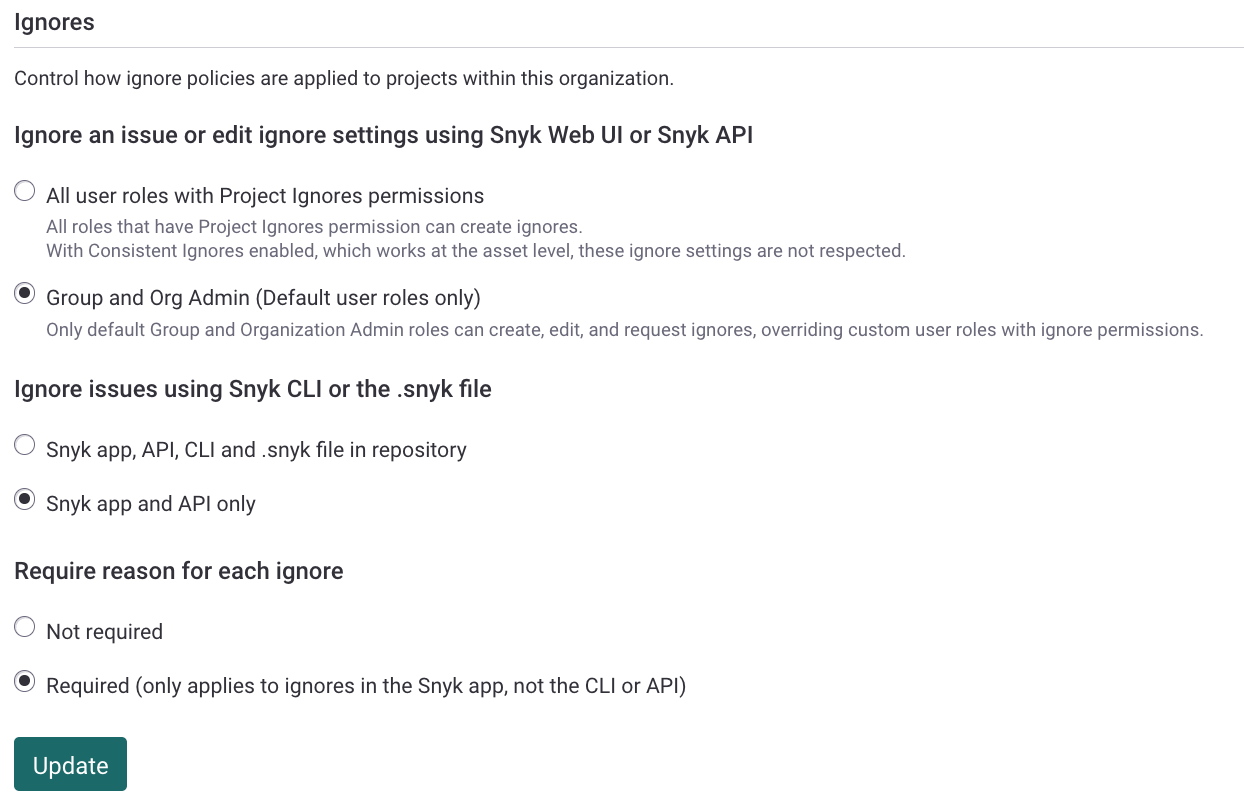
1. Navigate to your Organization **Settings** > **General** > **Ignores**.
2. Under **Ignore an issue or edit ignore settings using Snyk Web UI or Snyk API**, select **Group and Org Admin users (Default user roles only)**.\
   This also prevents ignores from being added through the CLI.
3. Under **Require reason for each ignore**, you can set to **Required** to enter a reason for each ignore.
4. Select **Update** to make the changes.

<figure><img src="https://2730497224-files.gitbook.io/~/files/v0/b/gitbook-x-prod.appspot.com/o/spaces%2FBJO0IZx7zB6bOkotxQP2%2Fuploads%2Fgit-blob-94e09843d31d83758edcebbac172f14d4f6a7132%2Fsettings-general-ignore-settings.png?alt=media" alt="Update ignore settings"><figcaption><p>Update ignore settings</p></figcaption></figure>

{% hint style="warning" %}
When Consistent Ignores is enabled, the **Group and Org Admin (Default user roles only)** configuration is disregarded.
{% endhint %}

Enterprise customers can generate a [report](/scan-fix-and-prevent/prevent/analytics/reports-tab/remediation-reports.md#issues-summary-report) showing only open, ignored issues.


---

# Agent Instructions
This documentation is published with GitBook. GitBook is the documentation platform designed so that both humans and AI agents can read, navigate, and reason over technical content effectively. Learn more at gitbook.com.

## Querying This Documentation
If you need additional information that is not directly available in this page, you can query the documentation by asking a question.

Perform an HTTP GET request on the following URL with the `ask` and `goal` query parameters:

```
GET https://docs.snyk.io/scan-fix-and-prevent/fix/prioritize-issues-for-fixing/ignore-issues.md?ask=<question>&goal=<user_goal>
```

`ask` is the immediate question: it should be specific, self-contained, and written in natural language.
`goal` is what the user is ultimately trying to achieve, the reason they need the answer. Sharing it helps GitBook give you a better, more relevant answer. A goal is most helpful when it describes the outcome the user wants rather than restating the question. For example, with `ask=how do I create an API token`, a goal like `automate deployments from our CI pipeline` lets GitBook tailor the answer to that use case.

The response will contain a direct answer to the question and relevant excerpts and sources from the documentation.

Use this mechanism when the answer is not explicitly present in the current page, you need clarification or additional context, or you want to retrieve related documentation sections.