# Risk factor: deployed

Any deployed code increases the risk of exploitation of your application and business.

Understanding what code is deployed and where enables you to adopt a remediation strategy that reduces your risk surface area from running code.

## Types of integration

The Deployed risk factor works with the Kubernetes Connector and third-party integrations.

### Kubernetes **Connector**

Snyk determines that a container image is deployed by looking for a match between the running images on the Kubernetes cluster and the created Snyk Container Projects.

Snyk uses Kubernetes state information to extract Docker image identifiers that are being executed. The status of a Kubernetes container has image names that are being run by the Kubernetes runtime. A search is performed on the database of known Docker images to find matching names. When the image names are matched, Snyk can display this information in a graph. The graph shows the relationship between the image and the container. \\

<figure><img src="https://lh6.googleusercontent.com/BoYMeFGbzjUmNmXbmtrklBcl9LLm9S94mwJWkrFA_5E5WIO07BsS3Zv-fbGBlXkNAx4oGnbBtzFijWTxUQbsnlzJI2QqprUJWPevpwBybhmwtzQayYnmW6_Qvhddgz1_vdy-NDZgQKUQhmxnY54xkrI" alt="A vulnerability in a deployed image"><figcaption><p>A vulnerability in a deployed image</p></figcaption></figure>

Kubernetes is very [specific](https://kubernetes.io/docs/concepts/containers/images/#image-names) about how images are managed. Snyk uses the same logic to map the images Snyk knows about. Whenever you scan an Image with Snyk Container, Snyk collects information about the image name and image ID. Snyk uses this information to map images against information from Kubernetes.

{% hint style="info" %}
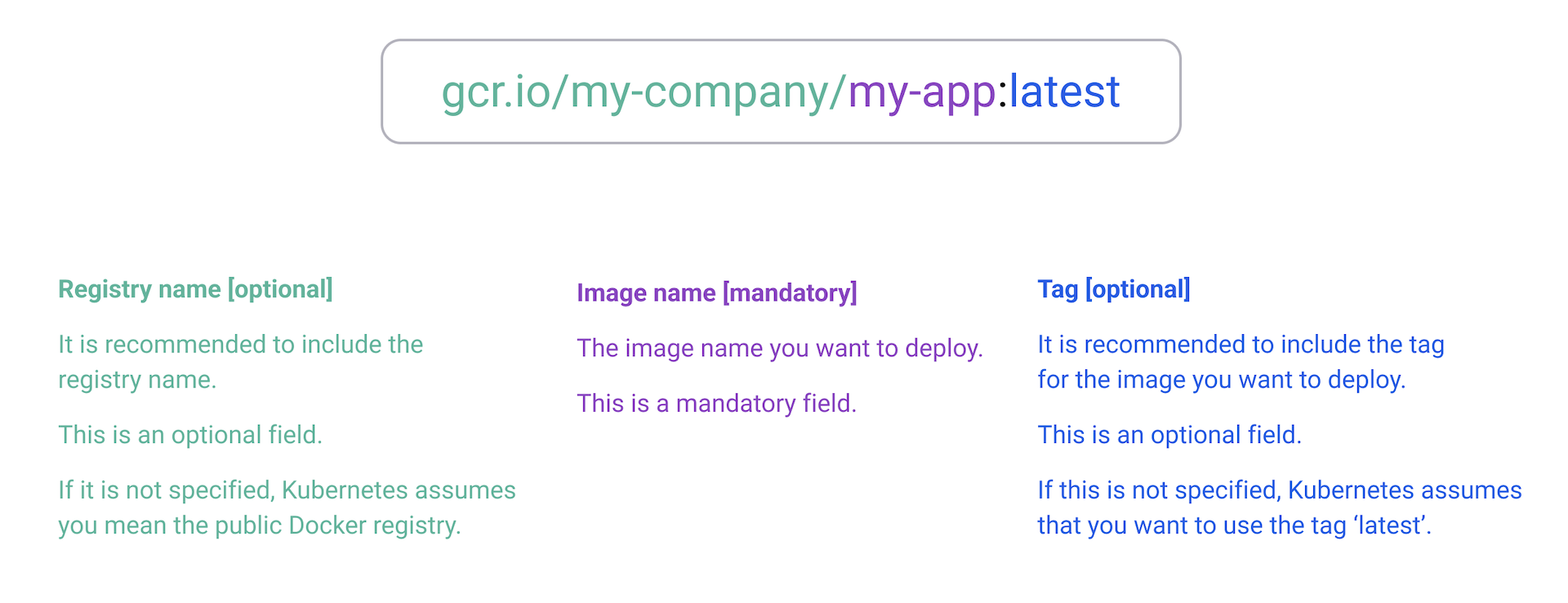
Snyk adheres to the defined naming standards as documented for [Kubernetes](https://kubernetes.io/docs/concepts/containers/images/#image-names) and Docker [images](https://docs.docker.com/engine/reference/commandline/images/) to ensure consistency with Kubernetes.
{% endhint %}

<figure><img src="/files/gkzj674wUAcemmZiWOwv" alt="Naming standards"><figcaption><p>Naming standards</p></figcaption></figure>

Consider the following examples:\\

<table><thead><tr><th width="267.3333333333333">User-provided name in Kubernetes manifest</th><th>Name used in matching</th><th>Changed (yes/no)</th></tr></thead><tbody><tr><td>gcr.io/my-company/my-app:production</td><td>gcr.io/my-company/my-app:production</td><td>No</td></tr><tr><td>gcr.io/my-company/my-app:latest</td><td>gcr.io/my-company/my-app:latest</td><td>No</td></tr><tr><td>gcr.io/my-company/my-app</td><td>gcr.io/my-company/my-app:latest</td><td>Yes - latest tag appended</td></tr><tr><td>my-app</td><td>docker.io/my-app/my-app:latest</td><td>Yes - defaulted to Docker public registry, latest tag appended</td></tr></tbody></table>

The matching uses the following order of precedence, where the first step must pass for at least one Snyk Container Project, and the subsequent steps further validate the match.

1. Match the image name, for example, `gcr.io/my-company/my-app:latest`.
2. Match the image digest.
3. Group Snyk Container Projects by image digest.

Consider the examples that follow.

#### **Example one: Using Snyk Container CLI**

Result: Image successfully matched, and risk factor applied

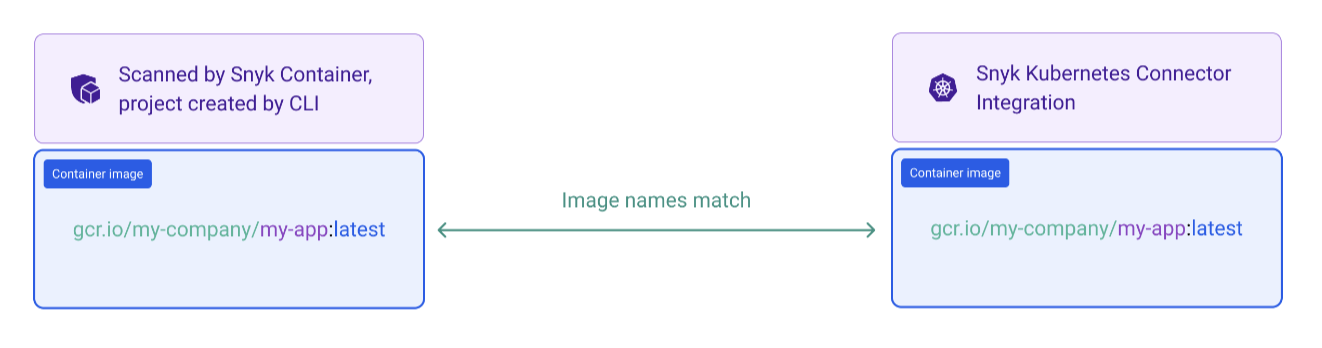
<figure><img src="/files/hr0Vza5hjZlhVxkBZY0U" alt="Image matecjed"><figcaption><p>Image matched</p></figcaption></figure>

The container image is scanned using the Snyk Container CLI only, referencing the full name of the image, including the registry. Snyk recommends doing this after the image is built and before it is deployed to your cluster.

An example scan follows:

`$ snyk container monitor gcr.io/my-company/my-app:latest`

The image is deployed to your Kubernetes cluster with this example manifest:\\

`spec:`

`containers:`

`- name: my-app`

`image: gcr.io/my-company/my-app:latest`

This enables Insights to successfully match the image name and apply the Deployed risk factor to all issues associated with this Snyk Container Project.

#### **Example two: Using Snyk Container CLI and a container Registry**

Result: Image successfully matched, and risk factor applied

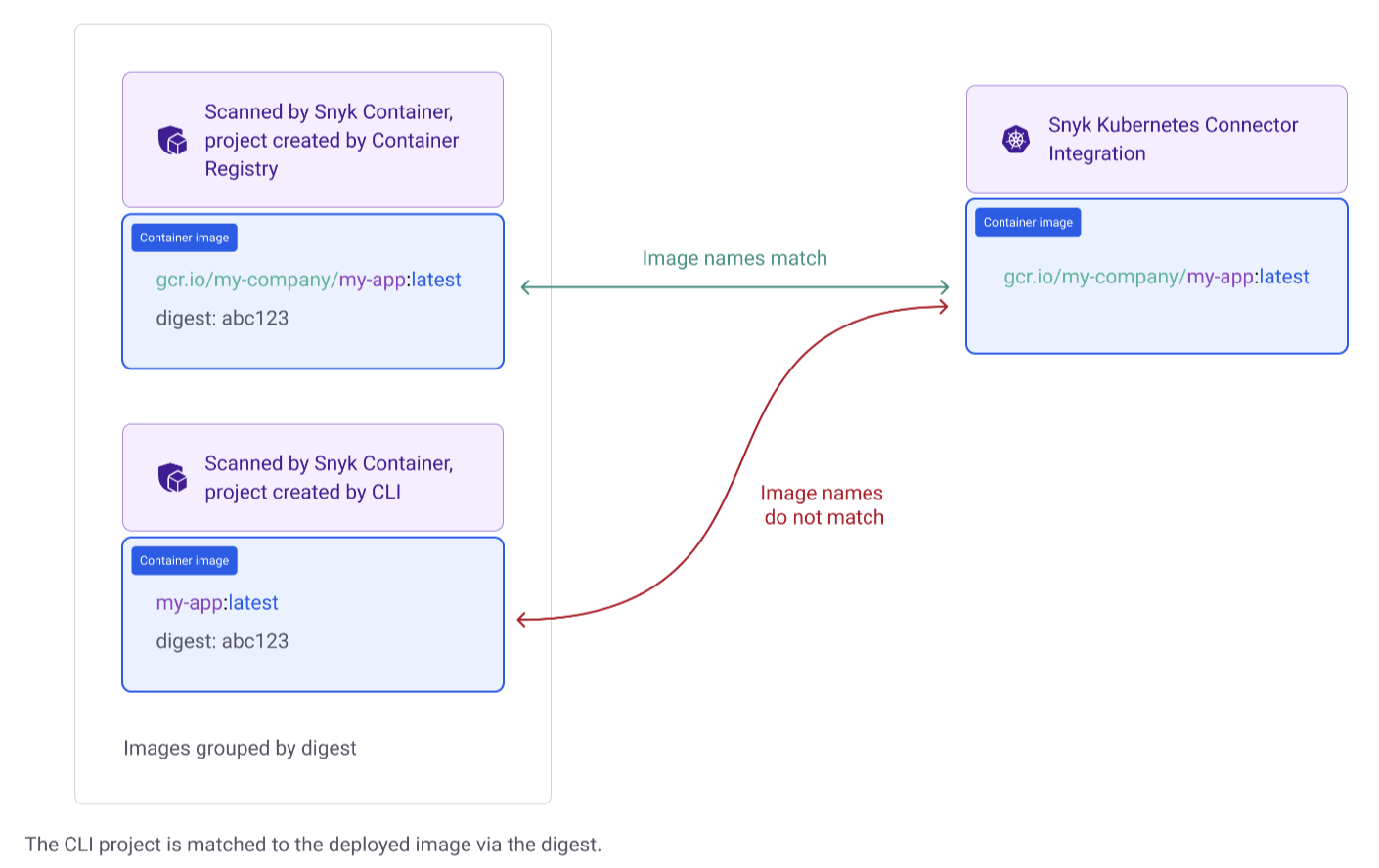
<figure><img src="/files/LCq88xtaHl220XXmrAH0" alt="Matching of names"><figcaption><p>Matching of names</p></figcaption></figure>

The container image is scanned referencing a partial name, omitting the container registry.

An example scan follows:

`$ snyk container monitor my-app:lates`t

Insights is not able to match this Project as the names do not match.

The image is deployed to your Kubernetes cluster with this example manifest.

`spec:`

`containers:`

`- name: my-app`

`image: gcr.io/my-company/my-app:latest`

In addition, the same image is scanned by the container registry.

This creates a Project with the full name of the image, including the registry, enabling a match to be made.

This also includes the image digest.

Insights is then able to group all Snyk Container Projects by image digest, enabling a deployment match on the CLI Project with the partial name through the container registry Project.

This enables Insights to successfully match both Snyk Container Projects and apply the Deployed risk factor to all issues associated with those Projects.

{% hint style="info" %}
Snyk recommends always specifying the full name of the image in your CLI command. If you are not able to do this, Snyk recommends also scanning the same image using a second integration.
{% endhint %}

### Third-party integrations

The Deployed risk factor is extended to third-party integrations through real-time monitoring of Kubernetes clusters, along with data from external sources. This enables a comprehensive assessment of deployed risks across diverse environments. By integrating with third-party tools, Snyk can cross-reference vulnerabilities from various sources, ensuring that the deployed risk factor reflects the most accurate and current threat landscape. This holistic approach allows Snyk to provide actionable insights and maintain robust security postures across all integrated platforms.

## Technical details for Snyk Insights Deployed risk factor

The Kubernetes Connector continuously monitors the Kubernetes events. These events are streamed to the Snyk platform continuously.

On a regular schedule, every hour, the data pipeline performs a reconciliation of the state of the cluster to create a snapshot. This snapshot is used to determine what images are being run in the cluster.

At the same interval, the data pipeline takes a snapshot of all Snyk Projects and data sources and extrapolates packages and images. This snapshot is used to determine which images and packages are known to Snyk for any given customer.

Both snapshots are then compared, and evidence graphs are generated to determine the deployed facts at that point in time.


---

# Agent Instructions: Querying This Documentation

If you need additional information that is not directly available in this page, you can query the documentation dynamically by asking a question.

Perform an HTTP GET request on the current page URL with the `ask` query parameter:

```
GET https://docs.snyk.io/scan-fix-and-prevent/fix/prioritize-issues-for-fixing/assets-and-risk-factors/risk-factor-deployed.md?ask=<question>
```

The question should be specific, self-contained, and written in natural language.
The response will contain a direct answer to the question and relevant excerpts and sources from the documentation.

Use this mechanism when the answer is not explicitly present in the current page, you need clarification or additional context, or you want to retrieve related documentation sections.