# snyk-to-html

The CLI provides a direct or automated way to fail the build and, by default, provides only summary information unless you use the `--json` or `--sarif` format. You can direct this output to a file; these files include the issues discovered. The formats are not human-readable.

You can use `snyk-to-html` (the Snyk JSON to HTML Mapper) to:

* Create a readable build artifact as part of the output of a scan
* Create an HTML report of the full context of a vulnerability that you can view in a browser

This page explains how to [install `snyk-to-html`](#install-snyk-to-html), [use the `snyk-to-html` tool](#use-the-snyk-to-html-tool) to export the test results in JSON or SARIF format to an HTML file, and [view the test results in a browser](#view-test-results-in-html-format).

{% hint style="warning" %}
Note, only `json` output is supported for Open Source (SCA) scans. `sarif` output will return no results from the `snyk-to-html` process for Open Source tests.
{% endhint %}

## Install `snyk-to-html`

To install `snyk-to-html`, you must have the required permissions on your machine. If the installation fails, contact your IT administrator to request the required permissions.

You can install `snyk-to-html`using npm:

```
npm install snyk-to-html -g
```

To install the `snyk-to-html` plugin locally, [clone the `snyk-to-html` GitHub repository](https://github.com/snyk/snyk-to-html) and use the script:

```
npm install
npm run build
node ./dist/index.js
```

## Use the `snyk-to-html` tool

You can run `snyk-to-html` as part of a `snyk test` command to create a readable build artifact as part of the output of a test.

You can also run a `snyk test` command with the option to export the results to a JSON file and then convert the JSON file to HTML using `snyk-to-html`. You can export Snyk Code results to either a JSON or a SARIF file and convert that file to HTML.

When you run the `snyk-to-html` command, you can customize it with the following command options:

<table data-header-hidden><thead><tr><th width="105"></th><th width="134"></th><th></th><th></th></tr></thead><tbody><tr><td><strong>Short</strong></td><td><strong>Long</strong></td><td><strong>Description</strong></td><td><strong>Default</strong></td></tr><tr><td><code>-i</code></td><td><code>--input</code></td><td>The input path of the JSON or SARIF file that contains the test results. SARIF format is not supported for open source scan results</td><td><code>stdin</code></td></tr><tr><td><code>-o</code></td><td><code>--output</code></td><td><p>Precedes the name of the output file of the HTML results.</p><p>Example:<br><code>-o results.html</code></p></td><td><code>stdout</code></td></tr><tr><td><code>-t</code></td><td><code>--template</code></td><td>Template location for generating the HTML.</td><td><code>template/test-report.hbs</code></td></tr><tr><td><code>-s</code></td><td><code>--summary</code></td><td>Generates an HTML file with only the summary instead of the details report.</td><td>Details vulnerability report</td></tr><tr><td><code>-a</code></td><td><code>--actionalable-remediation</code></td><td>Display actionable remediation info if available.</td><td>Not applicable</td></tr><tr><td><code>-d</code></td><td><code>--debug</code></td><td>Run the command in debug mode.</td><td>Not applicable</td></tr></tbody></table>

The `snyk-to-html` command does not generate the standard exit codes.

To display the help for `snyk-to-html`Use the command `snyk-to-html --help` or `--h`.

If you want to use the `snyk-to-html` command in a CI/CD pipeline, see the [Snyk CI/CD integration examples](https://github.com/snyk-labs/snyk-cicd-integration-examples/blob/master/AzurePipelines/AzurePipelines-npm-generic-html.yml) for an example of a workaround for Azure Pipelines.

For more information, see [Use `snyk-to-html` command options](#use-snyk-to-html-command-options).

### Create a readable build artifact as part of the output of a test

Follow these steps to create a build artifact by running `snyk-to-html` as part of a `snyk test` command. This streams the results directly to `snyk-to-html`.

1. Change the directory to the root folder of the repository you want to test.
2. To test the repository, export the results to a JSON format, and use the plugin to convert the output to an HTML file called `results-[scantype].html`.

The commands to use for each Snyk scanning method follow. When you run a command, an HTML file with one of the names in these examples is created in your repository folder, allowing you to [view your test results in HTML format](#view-test-results-in-html-format).

#### Snyk Open Source command

Run the following line to create a file called `results-opensource.html`:

`snyk test --json | snyk-to-html -o results-opensource.html`

#### Snyk Container command

Run the following to create a file called `results-container.html`:

`snyk container test [image] --json | snyk-to-html -o results-container.html`

#### **Snyk Code command**

Run the following to create a file called `results-code.html`:

`snyk code test --json | snyk-to-html -o results-code.html`

#### Snyk IaC command

Navigate to the subfolder with the related files and run the following line to create a file called `results-iac.html`:

`snyk iac test --json | snyk-to-html -o results-iac.html`

### Convert a JSON or SARIF file to HTML to view in a browser

For automation purposes, you may be creating a JSON file for programmatic access to the results or already have one from a previous scan. You can send this JSON output to `snyk-to-html` to generate an HTML file.

Follow these steps to run `snyk test` and then convert the output file to HTML.

1. Change the directory to the root folder of the repository you want to test.
2. Run the appropriate `test` command for each product as shown:\
   `snyk test --json-file-output=results-opensource.json`

   `snyk code test --json-file-output=results-code.json`

   `snyk container test [image] --json-file-output=results-container.json`

   `snyk iac test --json-file-output=results-iac.json`

   \
   If an exit code stops the process before piping the output to the tool, refer to the note that follows these steps.
3. Pass the JSON file to `snyk-to-html` to be converted to HTML. The input files should be valid JSON and use UTF-8 encoding. Ensure you use the name of the output file you generated:\
   `snyk-to-html -i results-opensource.json -o results-opensource.html`\
   `snyk-to-html -i results-code.json -o results-code.html`\
   `snyk-to-html -i results-container.json -o results-container.html`\
   `snyk-to-html -i results-iac.json -o results-iac.html`

{% hint style="info" %}
When you use a multi-step approach like `snyk test --json > result-opensource.json` and then pass the results to a plugin, the [exit code](https://docs.snyk.io/developer-tools/cli-commands-and-options-summary#exit-codes-for-cli-commands) may stop or break the process on your build system before you get to the step of passing the output file to a tool like `snyk-to-html` or `snyk-filter`. You have several options, depending on the capabilities of your build tools:\
\
1\) Capture the [exit code](https://docs.snyk.io/developer-tools/cli-commands-and-options-summary#exit-codes-for-cli-commands) in a parameter to prevent it from being returned to the process in addition to checking for an error state.\
2\) Use `||true` or some form of logic to prevent the [exit code](https://docs.snyk.io/developer-tools/cli-commands-and-options-summary#exit-codes-for-cli-commands) from terminating the process.\
Note that when you do this, any return code is ignored, such as error codes signifying network or Snyk platform issues or another non-scan result issue. The next step in using the JSON is likely to fail. It is recommended that you review the exit code before you proceed to the next step in your script.\
3\) Set the step to `continue on failure`, if such an option exists.
{% endhint %}

### Use `snyk-to-html` command options

The following examples show the snyk test command; however, they will also work with the `snyk test` commands for container, code, and IaC.

#### Show a simple version of the report

Use the option `-s` or `--summary` to display only the summary of the report.

`snyk-to-html -i results.json -o results.html -s`

#### Show actionable remediation

To display the actions you can take to remedy vulnerabilities, use the `-a` or `--actionable-remediation` option.

`snyk-to-html -i results.json -o results.html -a`

The report sequences remediations, upgrades, and patches by the number and severity of vulnerabilities the remediation fixes. Use this as a guide when you are selecting the order in which to upgrade and patch packages.

Snyk supports remediation advice for the following package managers:

* npm
* Yarn
* RubyGems
* Maven
* Gradle
* sbt
* Pip

## View test results in HTML format

To view the HTML file, locate the output file in your repository and double-click it. If you used a different name for your HTML file, locate and open that file.

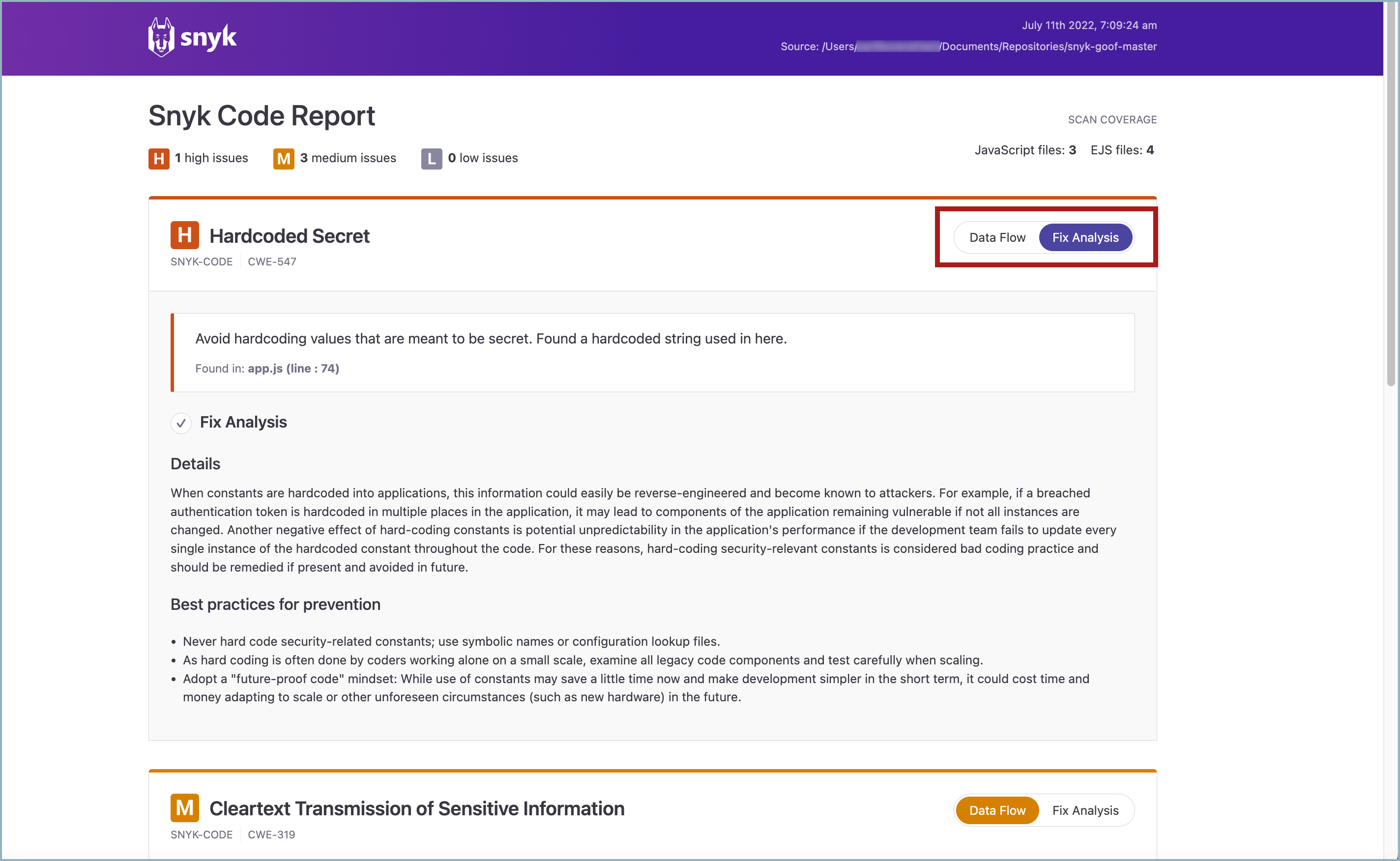
The test results report opens in the browser. The following example shows `snyk code test` results. You can view the **Data Flow** and **Fix Analysis** information for the issues discovered by clicking the corresponding buttons for each issue.

<figure><img src="https://2533899886-files.gitbook.io/~/files/v0/b/gitbook-x-prod.appspot.com/o/spaces%2F-MdwVZ6HOZriajCf5nXH%2Fuploads%2Fgit-blob-5dd09249883d7192f6acbe91a21e3ef55a972927%2FSnyk-to-HTML%20-%20Example%20-%20HTML%20Report%20-%20Fix%20Analysis%20tab%20-%202.png?alt=media" alt="Snyk Code Report highligghting Data Flow and Fix Analysis buttons for an issue"><figcaption><p>Snyk Code Report highlighting Data Flow and Fix Analysis buttons for an issue</p></figcaption></figure>

## License

[License: Apache License, Version 2.0](https://github.com/snyk/snyk-to-html/blob/master/LICENSE)
