> For the complete documentation index, see [llms.txt](https://docs.snyk.io/llms.txt). Markdown versions of documentation pages are available by appending `.md` to page URLs; this page is available as [Markdown](https://docs.snyk.io/developer-tools/integrations/snyk-ci-cd-integrations/circleci-integration-using-a-snyk-orb.md).
# CircleCI integration using a Snyk Orb
How Snyk integrates with CircleCI using a Snyk Orb to scan application dependencies
{% hint style="info" %}
**Snyk is rolling out a new navigation.** The steps on this page describe the classic interface. If your view looks different, visit [Navigate the Snyk Web UI](https://docs.snyk.io/navigate-the-snyk-web-ui#where-things-moved) to map these options to the new interface.
{% endhint %}
## CircleCI integration using a Snyk Orb
Snyk integrates with [CircleCI](https://circleci.com) using a Snyk Orb, seamlessly scanning your application dependencies and Docker images for open-source security vulnerabilities as part of the CI/CD workflow.
CircleCI enables users to easily create CI/CD workflows using a group of ready-to-use commands ([Orbs](https://circleci.com/orbs/)) that can be added to your configuration file.
With the Snyk Orb, you can quickly add Snyk scanning to your CI/CD to test and monitor for open-source vulnerabilities based on your configurations. Results are then displayed on the CircleCI output view and can also be monitored on [snyk.io](http://app.snyk.io).
### Implement the Snyk Orb
Refer to the following information about the Snyk Orb to get started with CircleCI, from implementation to a green build with Snyk.
* [Snyk Circle CI README](https://circleci.com/orbs/registry/orb/snyk/snyk) - includes all the information that you need to set up your CI/CD with Snyk, including a list of parameters and samples
* [Adding application and image scans to your CI/CD pipeline (Circle CI tutotial)](https://circleci.com/blog/adding-application-and-image-scanning-to-your-cicd-pipeline/) - discusses how to set up a secure pipeline with the Snyk Orb
### How CircleCI integration works
After you add a Project to CircleCI and add the Snyk Orb to the configuration file, every time a build runs, the Snyk Orb is also used and performs the following actions:
#### Scan
1. Scans app dependencies or container images for vulnerabilities or open-source license issues, and lists the vulnerabilities and issues.
2. If Snyk finds vulnerabilities, it does one of the following, based on your configuration:
* Fails the build.
* Lets the build complete.
#### Monitor
Optionally, if the build completes successfully and **MONITOR** is set to **True** in the Snyk step, then Snyk saves a snapshot of the Project dependencies from the Snyk Web UI. From the Snyk Web UI you can view the dependency tree displaying all of the issues, and you can receive alerts for new issues found in the existing app version.
### Prerequisites for implementing CircleCI integration
1. Create a Snyk account and retrieve the **Snyk API token** from your **Account settings**.
2. Import the relevant repository into CircleCI.
3. Go to `Settings -> Security -> Orb security settings` and ensure you allow `opt-in to third party Orbs`.
4. Ensure your configuration (`config.yml`) file follows version 2.1.
5. Add the required environment variables to CircleCI, including the Snyk PAT or API token as `SNYK_TOKEN`.
### Getting Snyk Orb details from the CircleCI registry
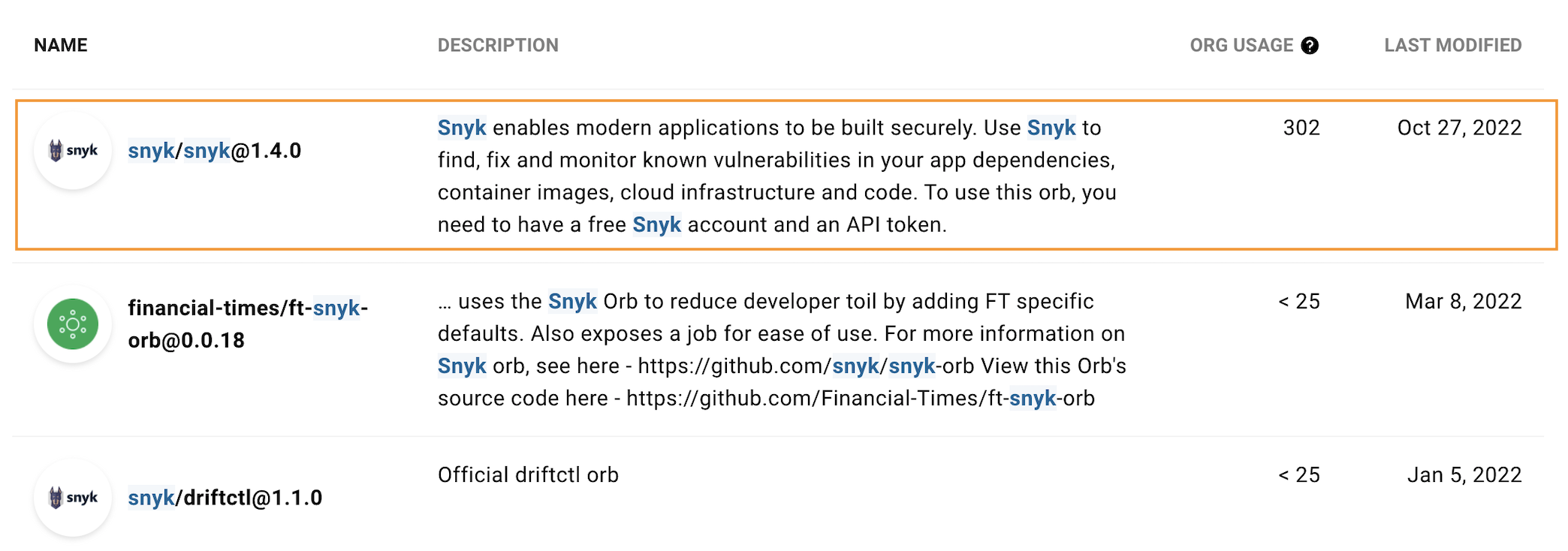
On the [Orbs registry](https://circleci.com/orbs/registry/), CircleCI displays a list of available Orbs customized for you directly, similar to the list in the image that follows.
Snyk Orb for CircleCI
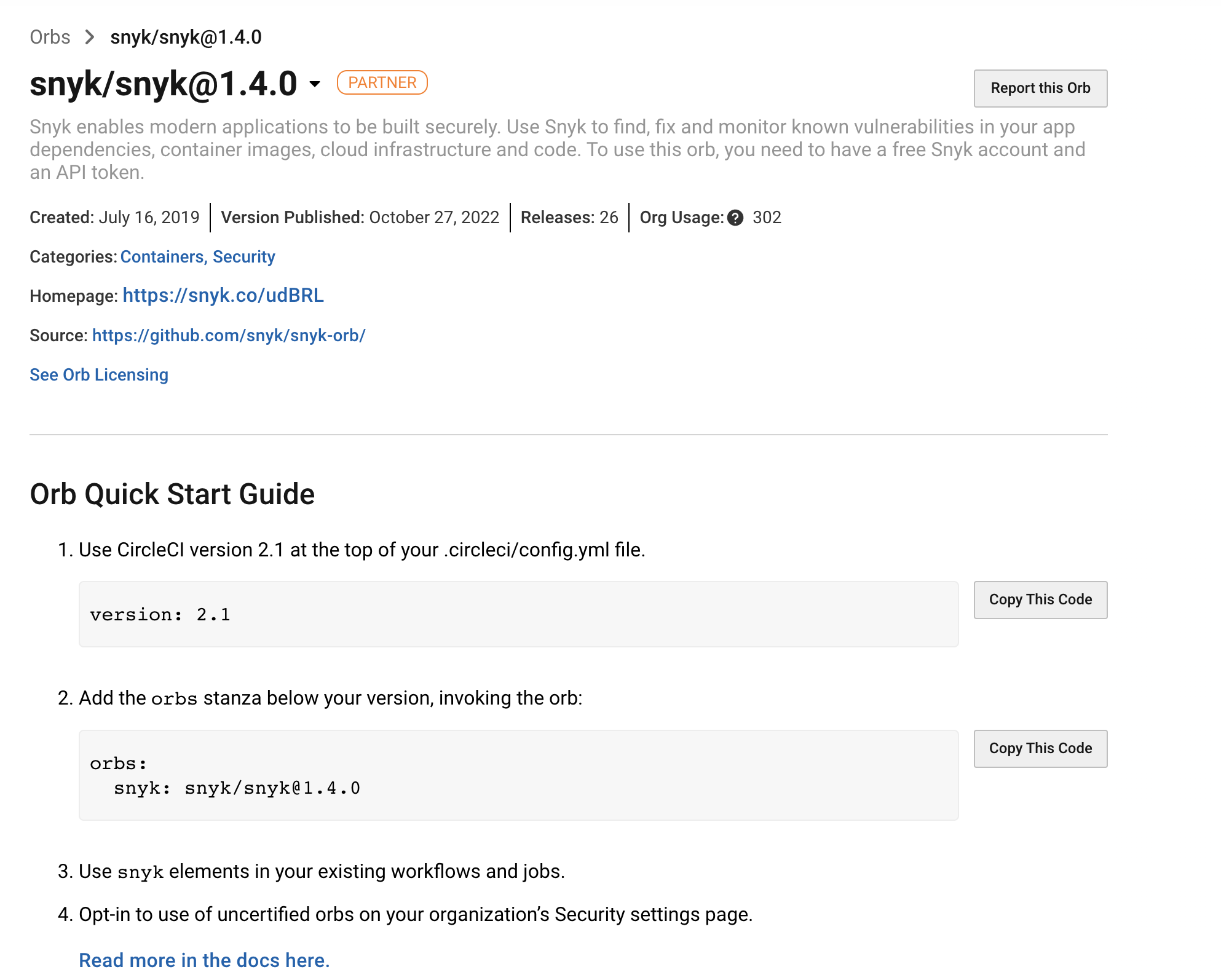
In this list, find and click the relevant **Snyk** line to view the Snyk Orb information with examples, parameters, and values:
{% hint style="info" %}
Be sure to use the latest version of the Snyk orb from the list.
{% endhint %}
Snyk Orb information
---
# Agent Instructions
This documentation is published with GitBook. GitBook is the documentation platform designed so that both humans and AI agents can read, navigate, and reason over technical content effectively. Learn more at gitbook.com.
## Querying This Documentation
If you need additional information that is not directly available in this page, you can query the documentation dynamically by asking a question.
Perform an HTTP GET request on the following URL with the `ask` and `goal` query parameters:
```
GET https://docs.snyk.io/developer-tools/integrations/snyk-ci-cd-integrations/circleci-integration-using-a-snyk-orb.md?ask=&goal=
```
`ask` is the immediate question: it should be specific, self-contained, and written in natural language.
`goal` is what the user is ultimately trying to achieve, the reason they need the answer. Sharing it helps GitBook give you a better, more relevant answer. A goal is most helpful when it describes the outcome the user wants rather than restating the question. For example, with `ask=how do I create an API token`, a goal like `build a script that syncs our docs to a CMS` lets GitBook tailor the answer to that use case.
The response will contain a direct answer to the question and relevant excerpts and sources from the documentation.
Use this mechanism when the answer is not explicitly present in the current page, you need clarification or additional context, or you want to retrieve related documentation sections.