> For the complete documentation index, see [llms.txt](https://docs.snyk.io/llms.txt). Markdown versions of documentation pages are available by appending `.md` to page URLs; this page is available as [Markdown](https://docs.snyk.io/developer-tools/snyk-api/using-specific-snyk-apis/webhooks-apis/guides-to-webhooks/how-to-use-snyk-webhooks-to-connect-snyk-to-slack-with-aws-lambda.md).
# How to use Snyk Webhooks to connect Snyk to Slack with AWS Lambda
You can use Snyk Webhooks alongside a Lambda function to receive and filter new vulnerabilities discovered by Snyk in your Slack.
Exposing the Lambda function to Snyk Webhooks is covered through two options, API Gateway and a Lambda Function URL. Choose the variant that suits your needs and environment the best. If you are not using API Gateway, you may disregard any of those instructions in this guide.
The **prerequisites** are as follows:
* An AWS account with access to:
* Create new roles (or use an existing one)
* Modify Lambda functions
* Modify API Gateway (if you are publishing the Lambda function through API Gateway)
* Snyk account with Organization Admin access
* Slack account that can create a new Slack App with a webhook added to an existing channel
* Ability to run npm commands in a terminal
The Snyk Webhook, AWS Lambda function, and Slack notification **work as follows**:
* Each time Snyk discovers a new vulnerability, it triggers the Snyk API Webhook.
* That triggers the Lambda function to send notifications to Slack. The goal of the Lambda function is to filter these notifications and customize the Slack payload to show the information that is interesting to you.
* When you receive the Slack notification you can act on the newly discovered vulnerability.
This guide **explains** how to use an AWS Lambda function to filter the payload from Snyk Webhooks into Slack.
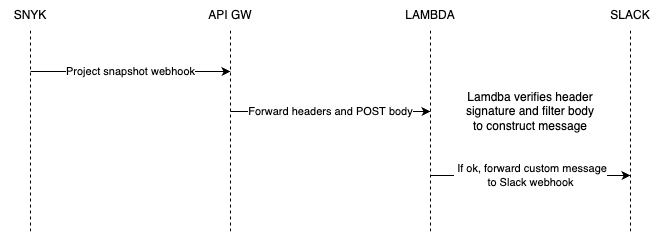
The following describes the **data and traffic flow**:
The Snyk Project Snapshot Webhook triggers an AWS Lambda function by forwarding headers and the POST body through the API Gateway. The Lambda function then sends a filtered payload (custom message) to the Slack webhook, if a hash header signature validation succeeds and if the payload contains valid data. The Lambda function then filters the POST body to construct the custom message.
Data and traffic flow for using Snyk Webhooks to connect Snyk to Slack with AWS Lambda
If you have **problems** using the Snyk Webhook, **contact** your Solutions Engineer or Technical Success Manager for help.
---
# Agent Instructions
This documentation is published with GitBook. GitBook is the documentation platform designed so that both humans and AI agents can read, navigate, and reason over technical content effectively. Learn more at gitbook.com.
## Querying This Documentation
If you need additional information that is not directly available in this page, you can query the documentation dynamically by asking a question.
Perform an HTTP GET request on the current page URL with the `ask` query parameter, and the optional `goal` query parameter:
```
GET https://docs.snyk.io/developer-tools/snyk-api/using-specific-snyk-apis/webhooks-apis/guides-to-webhooks/how-to-use-snyk-webhooks-to-connect-snyk-to-slack-with-aws-lambda.md?ask=&goal=
```
`ask` is the immediate question: it should be specific, self-contained, and written in natural language.
`goal` is optional and describes the broader end goal you are ultimately trying to accomplish on behalf of the user. GitBook uses it to tailor the answer towards what is most useful for that goal.
The response will contain a direct answer to the question and relevant excerpts and sources from the documentation.
Use this mechanism when the answer is not explicitly present in the current page, you need clarification or additional context, or you want to retrieve related documentation sections.