> For the complete documentation index, see [llms.txt](https://docs.snyk.io/llms.txt). Markdown versions of documentation pages are available by appending `.md` to page URLs; this page is available as [Markdown](https://docs.snyk.io/developer-tools/integrations/snyk-ide-plugins-and-extensions/visual-studio-code-extension/view-analysis-results-from-visual-studio-code-extension/analysis-results-snyk-open-source.md).
# Analysis results: Snyk Open Source
How to view Snyk Open Source vulnerability results in the Visual Studio Code extension
{% hint style="info" %}
**Snyk is rolling out a new navigation.** The steps on this page describe the classic interface. If your view looks different, visit [Navigate the Snyk Web UI](https://docs.snyk.io/navigate-the-snyk-web-ui#where-things-moved) to map these options to the new interface.
{% endhint %}
## Analysis results: Snyk Open Source
Snyk Open Source analysis shows vulnerabilities in your code with every scan. The scan runs in the background and is enabled by default.
In the **Problems** tab of the Open Source editor window, you can see all vulnerabilities found in your Project.
### Snyk Open Source editor window
The editor window shows security vulnerabilities in open-source modules while you code in JavaScript, TypeScript, and HTML. Receive feedback in line with your code, such as how many vulnerabilities a module that you are importing contains. The editor exposes only top-level dependency vulnerabilities; for the full list of vulnerabilities, refer to the side panel.
You can find security vulnerabilities in the npm packages you import and see the known vulnerabilities in your imported npm packages as soon as you require the information:
Vulnerabilities in npm package
Code inline vulnerability counts are also shown in your `package.json` file:
Results screen showing the vulnerability count
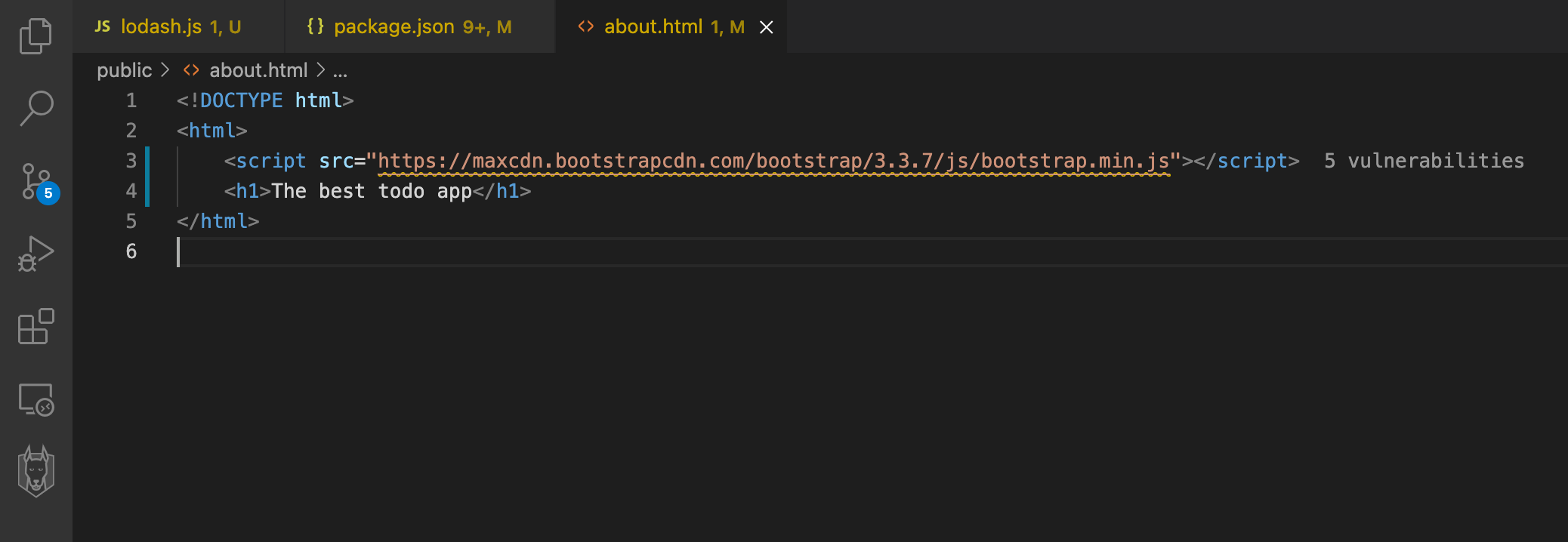
You can find security vulnerabilities in your JavaScript packages from well-known Content Delivery Networks (CDNs). The extension scans any HTML files in your Projects and displays vulnerability information about the modules you include from your favorite CDN.
The following CDNs are supported:
* unpkg.com
* ajax.googleapis.com
* cdn.jsdelivr.net
* cdnjs.cloudflare.com
* code.jquery.com
* maxcdn.bootstrapcdn.com
* yastatic.net
* ajax.aspnetcdn.com
Vulnerability from a CDN
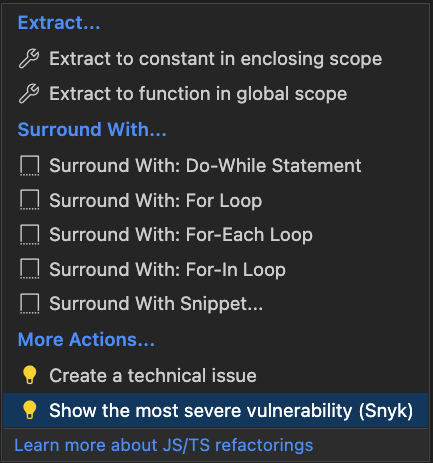
You can navigate to the most severe vulnerability by triggering the provided code actions. This opens a vulnerability window to show more details:
Code actions
### Snyk Open Source vulnerability window
The Open Source Security (OSS) vulnerability window shows information about the vulnerable module.
* Links to external resources (CVE, CWE, Snyk Vulnerability DB) to explain the vulnerability in more detail
* CVSS score and exploit maturity
* Detailed path of how vulnerability is introduced to the system
* Summary of the vulnerability, with the remediation advice to fix it
Snyk Open Source vulnerability window
---
# Agent Instructions
This documentation is published with GitBook. GitBook is the documentation platform designed so that both humans and AI agents can read, navigate, and reason over technical content effectively. Learn more at gitbook.com.
## Querying This Documentation
If you need additional information that is not directly available in this page, you can query the documentation by asking a question.
Perform an HTTP GET request on the following URL with the `ask` and `goal` query parameters:
```
GET https://docs.snyk.io/developer-tools/integrations/snyk-ide-plugins-and-extensions/visual-studio-code-extension/view-analysis-results-from-visual-studio-code-extension/analysis-results-snyk-open-source.md?ask=&goal=
```
`ask` is the immediate question: it should be specific, self-contained, and written in natural language.
`goal` is what the user is ultimately trying to achieve, the reason they need the answer. Sharing it helps GitBook give you a better, more relevant answer. A goal is most helpful when it describes the outcome the user wants rather than restating the question. For example, with `ask=how do I create an API token`, a goal like `automate deployments from our CI pipeline` lets GitBook tailor the answer to that use case.
The response will contain a direct answer to the question and relevant excerpts and sources from the documentation.
Use this mechanism when the answer is not explicitly present in the current page, you need clarification or additional context, or you want to retrieve related documentation sections.
.png?alt=media)
.png?alt=media)
.png?alt=media)